
Short answer: To make sure no renewal lapses, keep every policy, licence, contract and filing in one register with a due date, an owner and the current document. Then set automatic reminders at fixed intervals before each due date (for example 30, 15, 7 and 1 day), escalate anything overdue to a manager, and record each renewal as a new document version. A spreadsheet can hold the list, but it cannot remind or escalate, which is why growing businesses move to renewal tracking software.
Every business carries a long list of things that expire: vehicle and property insurance, health cover for staff, trade licences, fire NOCs, pollution certificates, annual maintenance contracts (AMCs), leases, domain names and software subscriptions, plus regular GST and other compliance filings. Each one is small on its own. Missing one can mean a penalty, an uninsured loss, a stopped service or an awkward conversation with an inspector.
Why renewals get missed
- The list lives in one person’s head or inbox. When that person is on leave or leaves the company, the knowledge goes with them.
- The spreadsheet is never opened. A renewal register is only useful if someone checks it, and spreadsheets do not send reminders.
- Nobody owns the renewal. Accounts thinks admin is handling it, admin thinks the branch is handling it.
- Documents are scattered. The current policy is in an email, last year’s is on a desktop and the vendor’s details are on someone’s phone.
- Late items are not escalated. A reminder that goes to one person and is ignored is the same as no reminder.
A simple system that works
1. Build one renewal register
List every item that expires, by category: insurance, licences and permits, compliance filings, contracts and AMCs, subscriptions. For each one, record the due date, the vendor or authority, the reference or policy number, the amount and the current document.
2. Give every renewal an owner
Each item should have one named person responsible, and a manager who can see its status. Ownership is the single biggest fix most businesses can make.
3. Set reminders at fixed intervals
One reminder is not enough. A common pattern is 30, 15, 7 and 1 day before the due date, which leaves time to collect quotes, get approvals and make payment. Send reminders where people will see them: email, SMS and in-app notifications.
4. Escalate anything overdue
If a due date passes without the renewal being recorded, the reminder should move up: to the owner’s manager, or to all admins, until it is resolved.
5. Store each renewal as a new version
When a policy or licence is renewed, upload the new document as a new version rather than replacing the old one. You keep a complete history for audits, claims and inspections.
6. Review a dashboard every week
A weekly look at what is due in the next 7, 15 and 30 days, what is overdue and how much money is due keeps renewals predictable instead of urgent.
Spreadsheet or renewal tracking software?
| Need | Spreadsheet | Renewal tracking software |
|---|---|---|
| List of due dates | Yes | Yes |
| Automatic reminders | No | Yes, at the intervals you choose |
| Escalation when overdue | No | Yes, to managers or admins |
| Document versions | Links at best | Every renewal stored with history |
| Approvals and audit trail | No | Manager approvals and a log of every change |
| Reports | Built by hand | Upcoming, overdue and category-wise reports in PDF or Excel |
If you track a handful of items, a well-kept spreadsheet and calendar reminders may be enough. Once you manage dozens or hundreds of policies, licences and contracts, especially across branches or for clients, software pays for itself the first time it prevents a lapse.
Who needs this most
- Insurance companies and agents managing renewals for many clients.
- Businesses with several sites, vehicles or machines, each with its own insurance and permits.
- Admin, finance and compliance teams responsible for licences, AMCs and filings.
- Managers who need a clear view of what is due and overdue without chasing people.
How Renewal360 helps

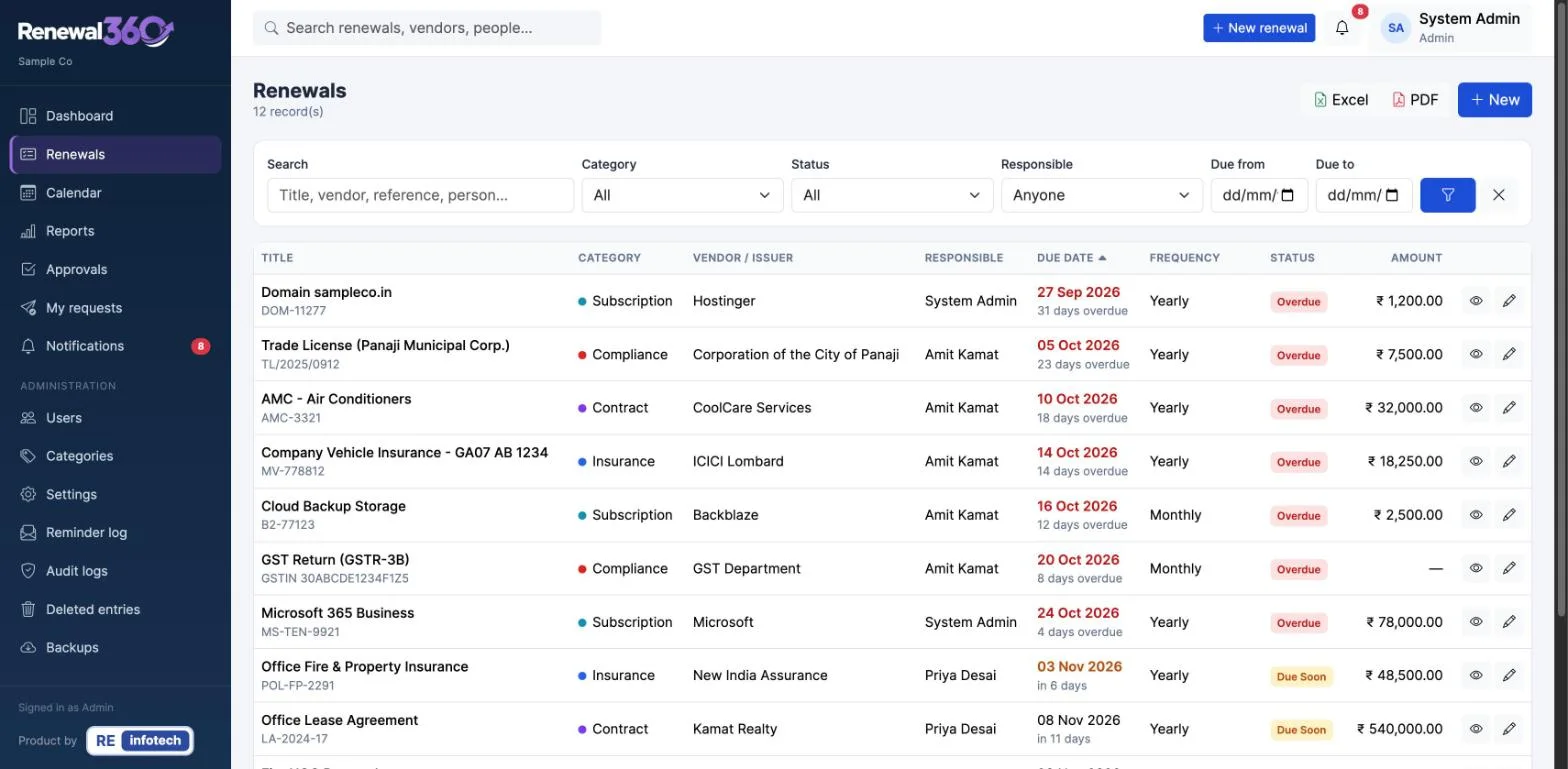
Renewal360, our renewal management software, follows the system above. Every insurance policy, licence, AMC, subscription and compliance date sits in one register with an owner, a due date and a status, and you can export the list to Excel or PDF.
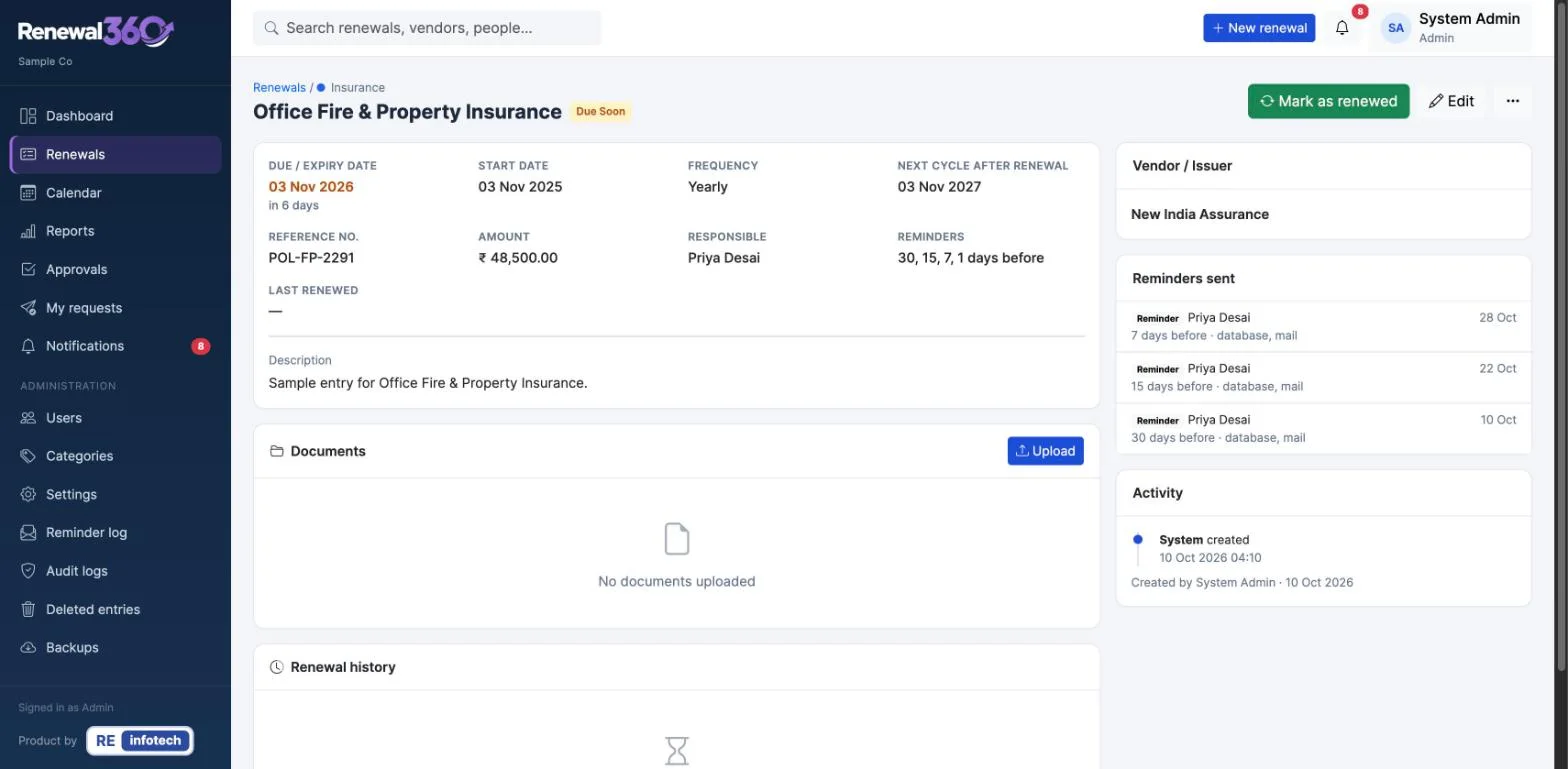
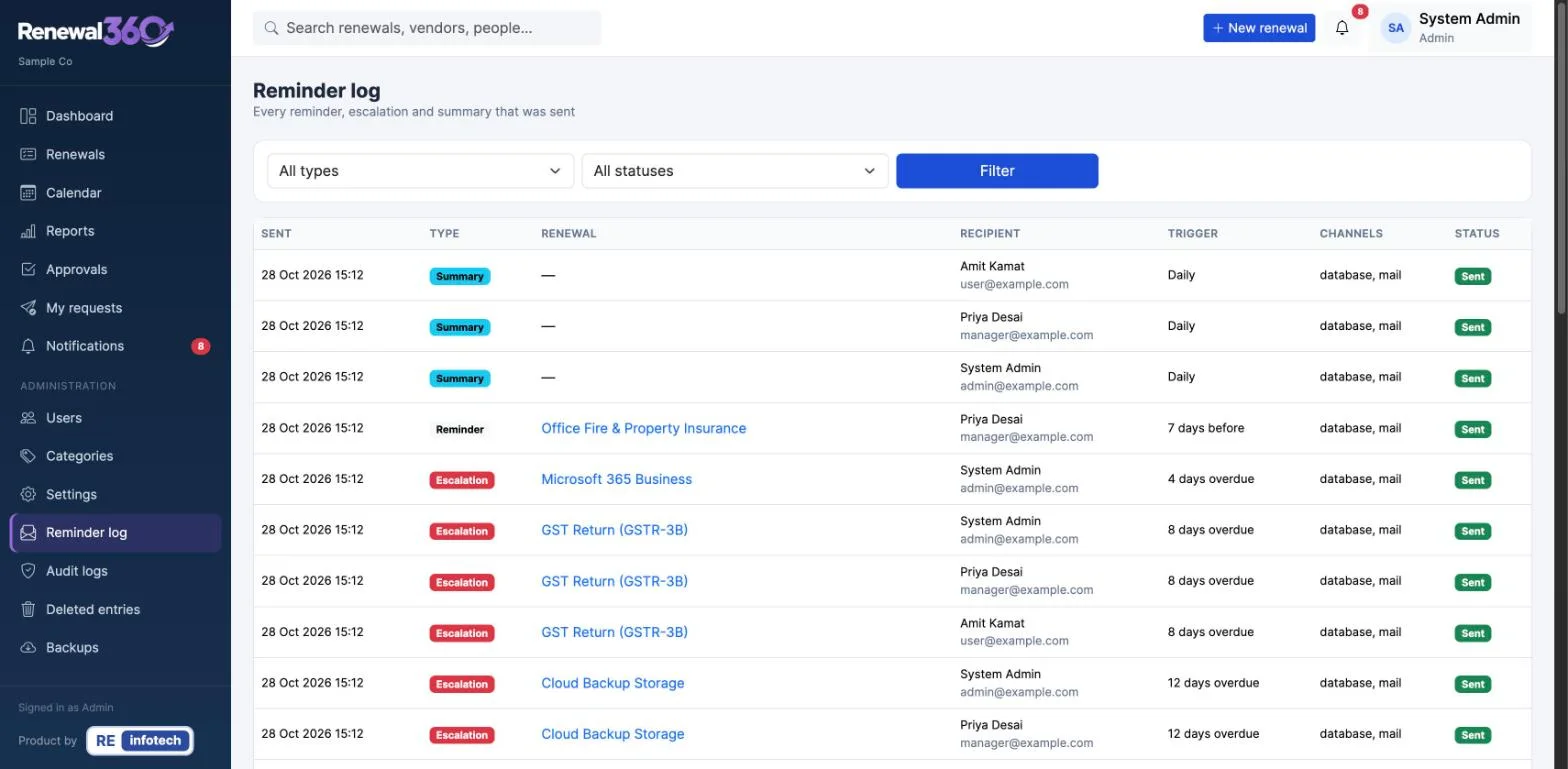
Each renewal carries its own reminder rhythm, for example 30, 15, 7 and 1 day before, and the record shows every reminder that was sent. When something goes past its due date, Renewal360 escalates it, and a daily summary goes to the people responsible.
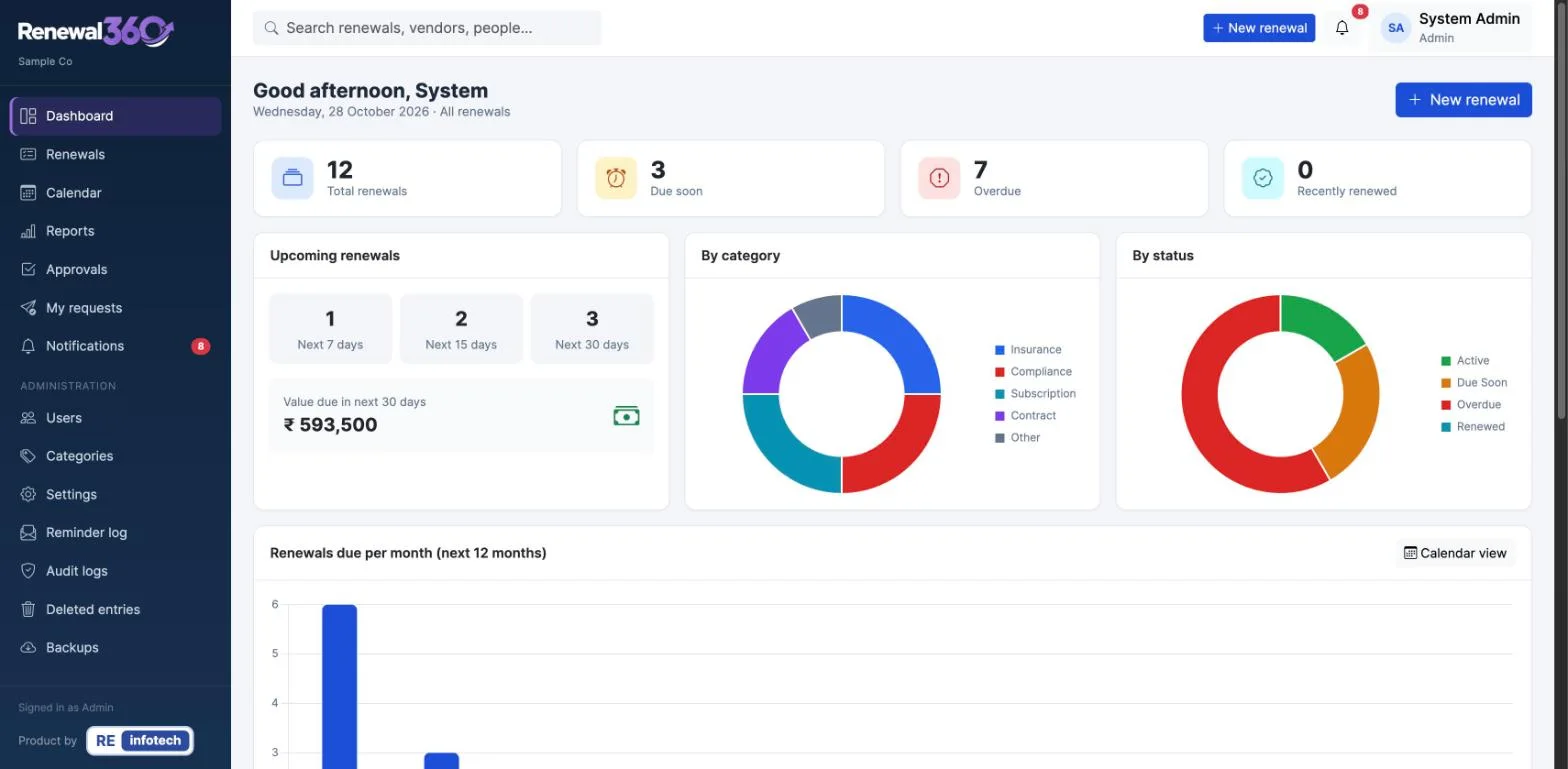
The dashboard and calendar show what is due in the next 7, 15 and 30 days, and the calendar can sync to Google Calendar or Outlook. Approvals, user roles and an audit log keep a record of who changed what.
Book a free demo to see it with sample data like the screenshots above.
Handling personal data while you track renewals? Our DPDP Act compliance guide explains what Indian businesses need to do.
Frequently asked questions
How far in advance should renewal reminders be sent?
A common pattern is 30, 15, 7 and 1 day before the due date. The first reminder leaves time to compare quotes and get approvals, and the later ones make sure payment is made on time.
What kinds of renewals should a business track?
Insurance policies, trade licences, fire NOCs and other permits, GST and compliance filings, annual maintenance contracts, leases, domain names and software subscriptions are the most common.
Can I track renewals in Excel?
Yes, for a small number of items. Excel can hold the list but cannot send reminders, escalate overdue items or keep an audit trail, so it depends on someone remembering to check it.
What happens if a renewal is missed in renewal software?
Good renewal software escalates an overdue item to the owner’s manager or to admins until it is renewed, so a missed reminder does not quietly become a lapse.