

Re-Infotech

Home / Products / Book360

Book360 by Re-Infotech

Book360: online appointment booking for hospitals and clinics

Book360 lets patients book appointments online with the doctor and time slot they want, and sends automatic reminders so fewer patients miss their visit. Your front desk manages doctors, slots and bookings from one admin panel.

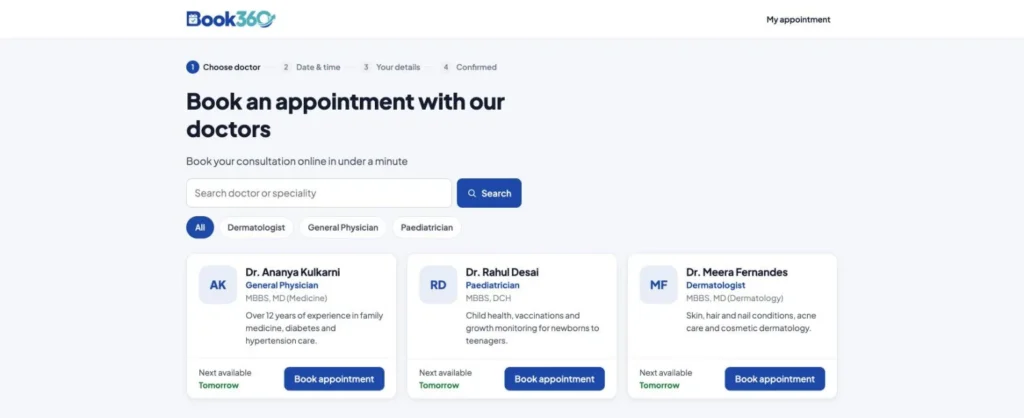
Book360 online appointment booking page where patients choose a doctor by speciality (sample data)

What is Book360?

Book360 is an online appointment booking system for hospitals and clinics, built by Re-Infotech. Patients choose a doctor and an available slot on your branded booking site, and the system sends confirmations and reminders by email, SMS or WhatsApp. Your team manages doctors, schedules, bookings and message templates from an admin panel. For a complete hospital system, see Hospicare360.

See it in action

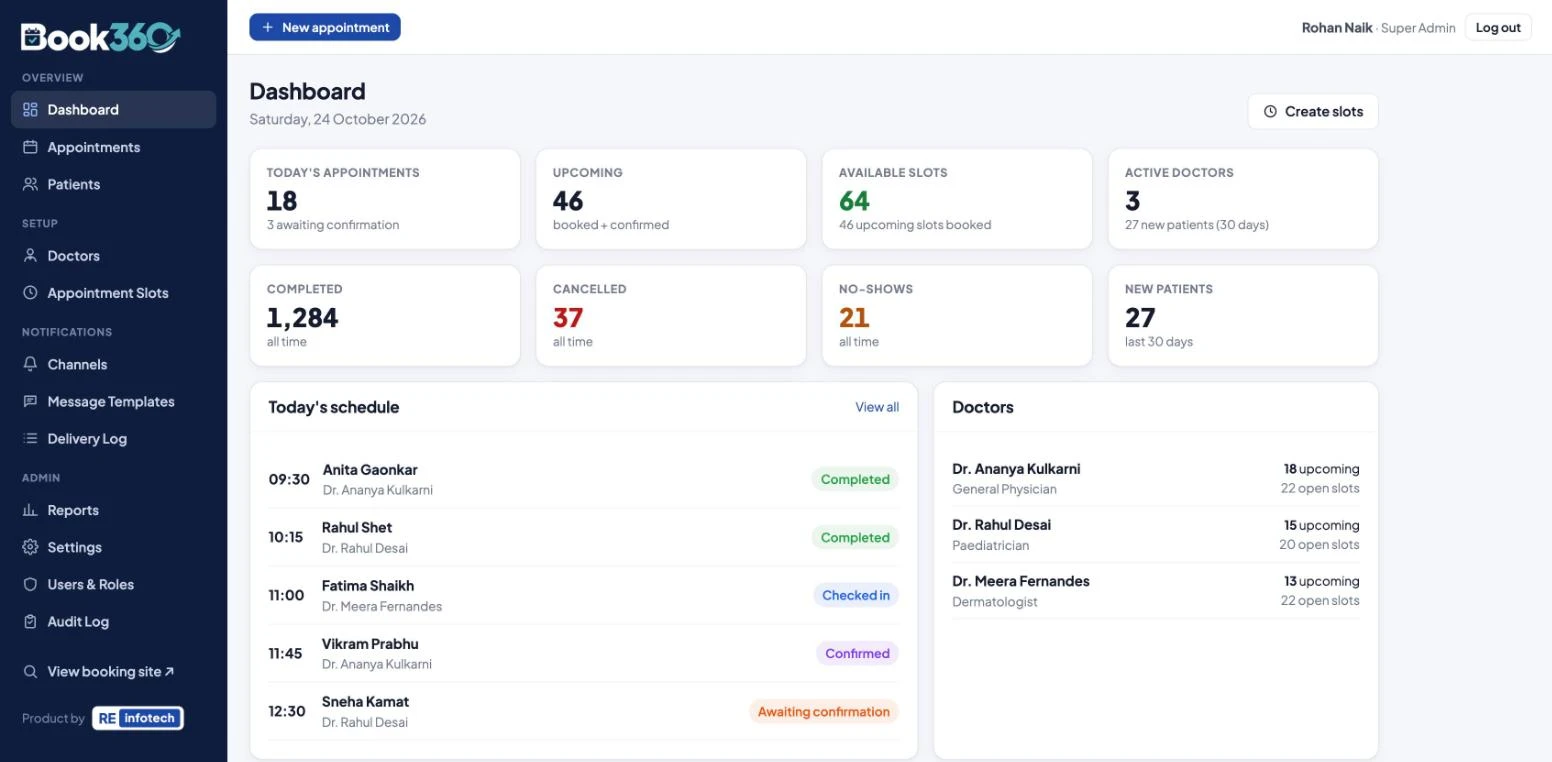
Today's appointments, doctors and slots in one view

Book360 dashboard
Book360 dashboard, shown with sample data.

Book360 features in screenshots
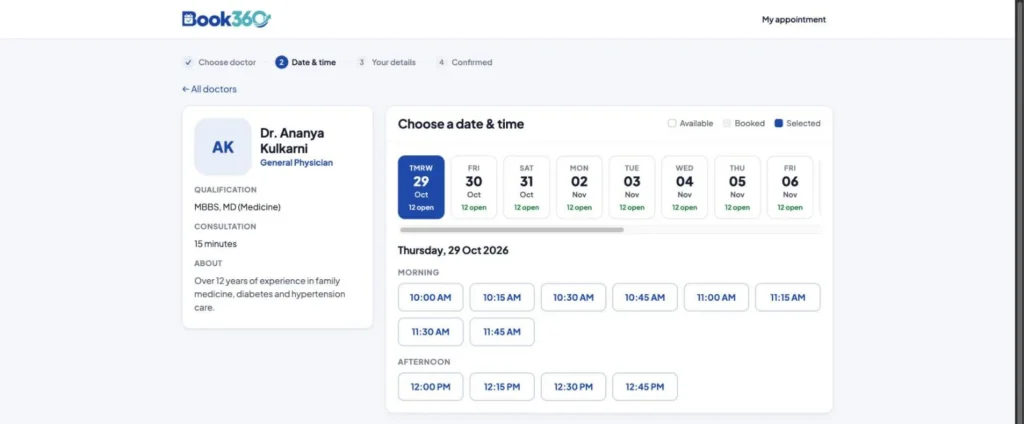
Book360 date and time slot picker showing open morning and afternoon slots for a doctor (sample data)

Patients choose a date and time slot

Book360 date and time slot picker showing open morning and afternoon slots for a doctor.
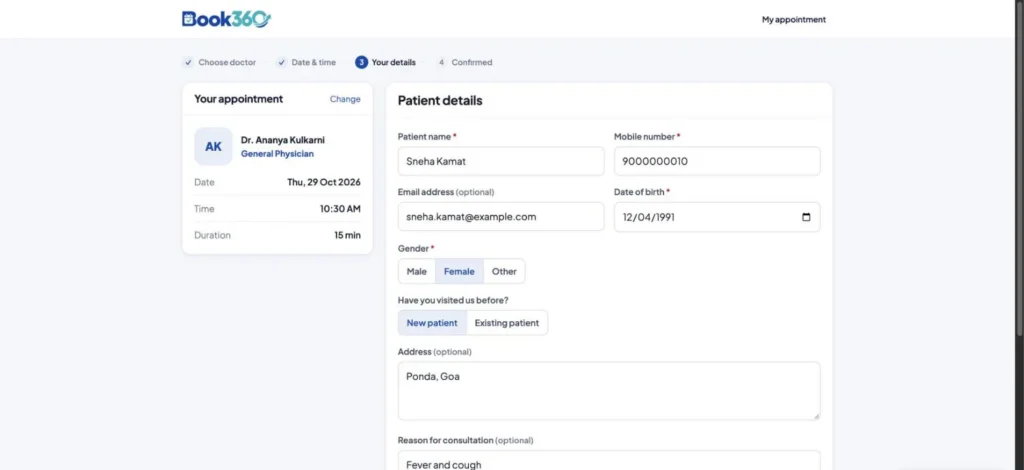
Book360 patient details form with name, mobile, email, date of birth, gender and reason for consultation (sample data)

Short patient details form

Book360 patient details form with name, mobile, email, date of birth, gender and reason for consultation.
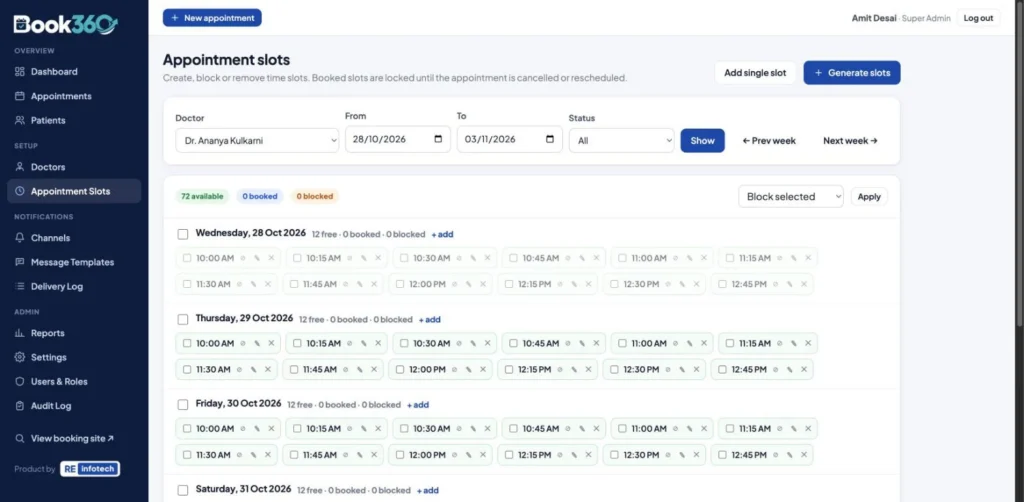
Book360 admin screen to generate, block and manage appointment slots for each doctor (sample data)

Appointment slots for each doctor

Book360 admin screen to generate, block and manage appointment slots for each doctor.
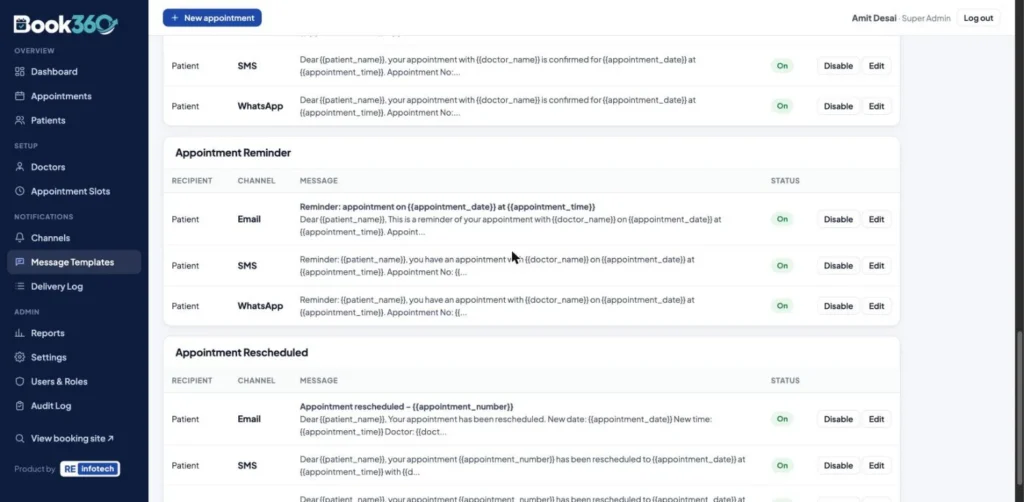
Book360 appointment reminder templates for email, SMS and WhatsApp

Appointment reminders

Book360 appointment reminder templates for email, SMS and WhatsApp.
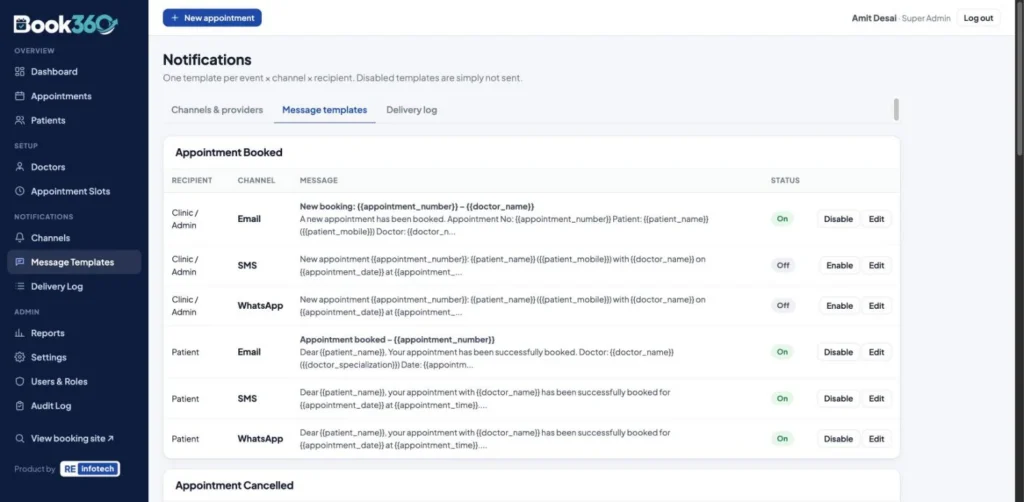
Book360 message templates for appointment booked by email, SMS and WhatsApp for patient and clinic

Message templates for WhatsApp, SMS and email

Book360 message templates for appointment booked by email, SMS and WhatsApp for patient and clinic.

Screenshots from the live Book360 app with sample data.

Who it’s for

Built for hospitals, clinics and their front desks

Book360 is for hospitals, multi-specialty clinics, single-doctor practices and diagnostic centres that take appointments by phone today and want patients to book online instead.

It cuts phone calls at the front desk, reduces no-shows with automatic reminders and gives your team a clear view of each doctor’s day.

Features

From booking to reminder, handled

Online booking

Patients pick a doctor and an available time slot on your booking site.

Doctors and slots

Add doctors with photos and set the time slots each one is available.

Automatic reminders

Confirmations and reminders by email, SMS or WhatsApp to reduce no-shows.

Message templates

Edit the wording of every confirmation and reminder message.

Admin panel

Manage doctors, schedules and bookings from one dashboard.

Your branding

Your logo and details on a booking site that works on any phone.

Who Book360 is for

  • Single-doctor clinics that want fewer calls just to fix appointments
  • Multi-doctor and multi-specialty clinics with different timings for each doctor
  • Fertility, dental, physiotherapy, eye and skin clinics
  • Diagnostic centres and hospitals’ OPD desks

How patients book with Book360

  1. The patient opens your booking link from your website, Google Business Profile, WhatsApp or Instagram.
  2. They pick the doctor, date and an available slot.
  3. They enter their name and phone number and confirm.
  4. Your front desk sees the booking in the admin calendar and the patient gets a confirmation.

FAQ

Frequently asked questions

Yes. The booking site works on any phone, so patients can choose a doctor and slot in a few taps.

Yes. It sends booking confirmations and reminders by email, SMS or WhatsApp, using message templates you can edit.

Yes. You can add each doctor with a photo and set their own available slots.

Yes. Add a Book appointment button to your website that opens your Book360 booking page.

Book a free demo and we will show you the system and set it up with your doctors and timings.

Yes. Google Business Profile lets you add an appointment link, so patients can book directly from Google Search and Maps.

Yes. Share your Book360 booking link in your Instagram bio, WhatsApp Business profile or messages, and patients can book in a few taps.

Book a free demo

Tell us a little about your organisation and we will call you back to arrange a free demo of Book360.

2nd Floor, Ponda Commerce Centre, SO-15, Tiska, Durgabhat, Ponda, Goa 403401
Monday to Saturday, 10 am to 6 pm
enquiry@re-infotech.com

What happens after you send this

We contact you

We call or WhatsApp you during working hours, Monday to Saturday, 10 am to 6 pm.

We listen

A short conversation about your business, goals and current setup.

You get a plan

Clear recommendations, scope and a fixed quote, with no obligation.

Your details are used only to respond to your enquiry. See our Privacy Notice.

Book a Consultation

Last updated: