

Re-Infotech

Home / Products / Chapter360

Chapter360 by Re-Infotech

Chapter360: run your whole networking chapter in one place

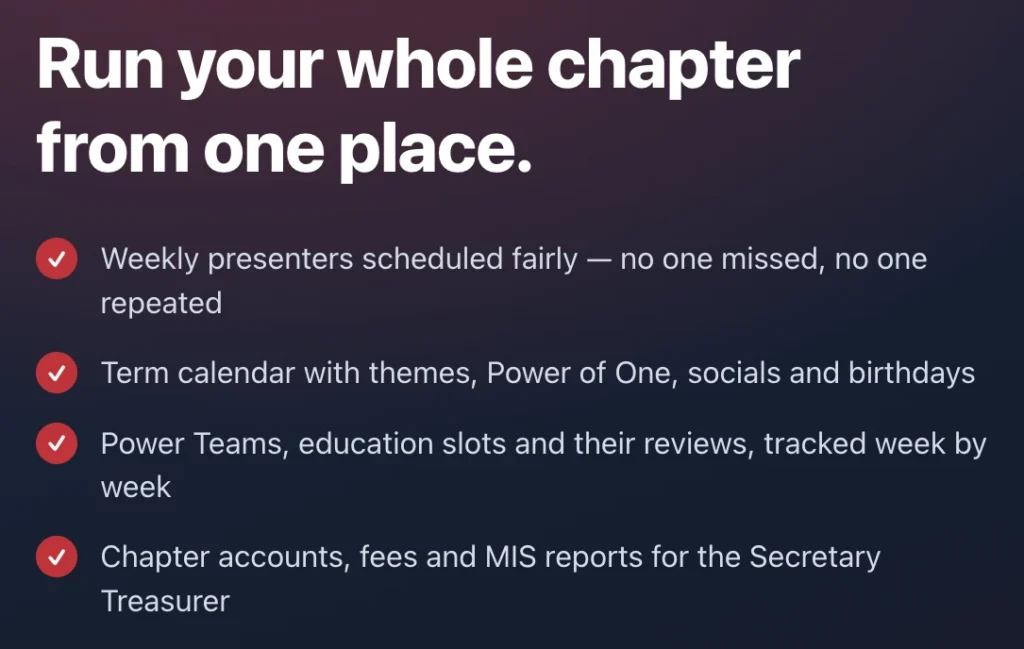
Chapter360 is chapter management software for business networking platforms. Weekly presenters are scheduled fairly, so no one is missed and no one is repeated. The term calendar holds themes, Power of One, socials and birthdays, Power Teams and education slots are tracked week by week, and the Secretary Treasurer gets chapter accounts, fees and MIS reports in one place. The Conclaves module runs multi-chapter events with QR registration, referrals logged from phones and a live scoreboard.

Chapter360 chapter management software: presenters, term calendar, Power Teams and chapter accounts

What is Chapter360?

Chapter360 is web-based software that helps a business networking chapter’s leadership team manage accounts, dues and renewals, weekly presentations, Power Teams, education slots, the term calendar and multi-chapter conclaves in one place. Each chapter gets its own secure web address, and access is controlled by role. It works in a phone browser, so the team can check the schedule or record a payment during the meeting. Chapter360 is an independent product built by Re-Infotech and is not affiliated with or endorsed by any networking organisation. See it at chapter360.in.

How it works

A whole term, run from one place

  1. Set up the term

    Add members, categories and Power Teams, and load the term calendar with meeting dates, themes, Power of One weeks, socials and birthdays.

  2. Schedule presenters and education

    Chapter360 spreads weekly presentations fairly across members and lets you assign each education slot and topic.

  3. Run the weekly meeting

    Check who is presenting, who is on education and what is coming up, and record payments from your phone during the meeting.

  4. Review and report

    Track Power Team meetings and education reviews week by week, and give the leadership team accounts, fees and MIS reports.

See it in action

Six modules, one chapter

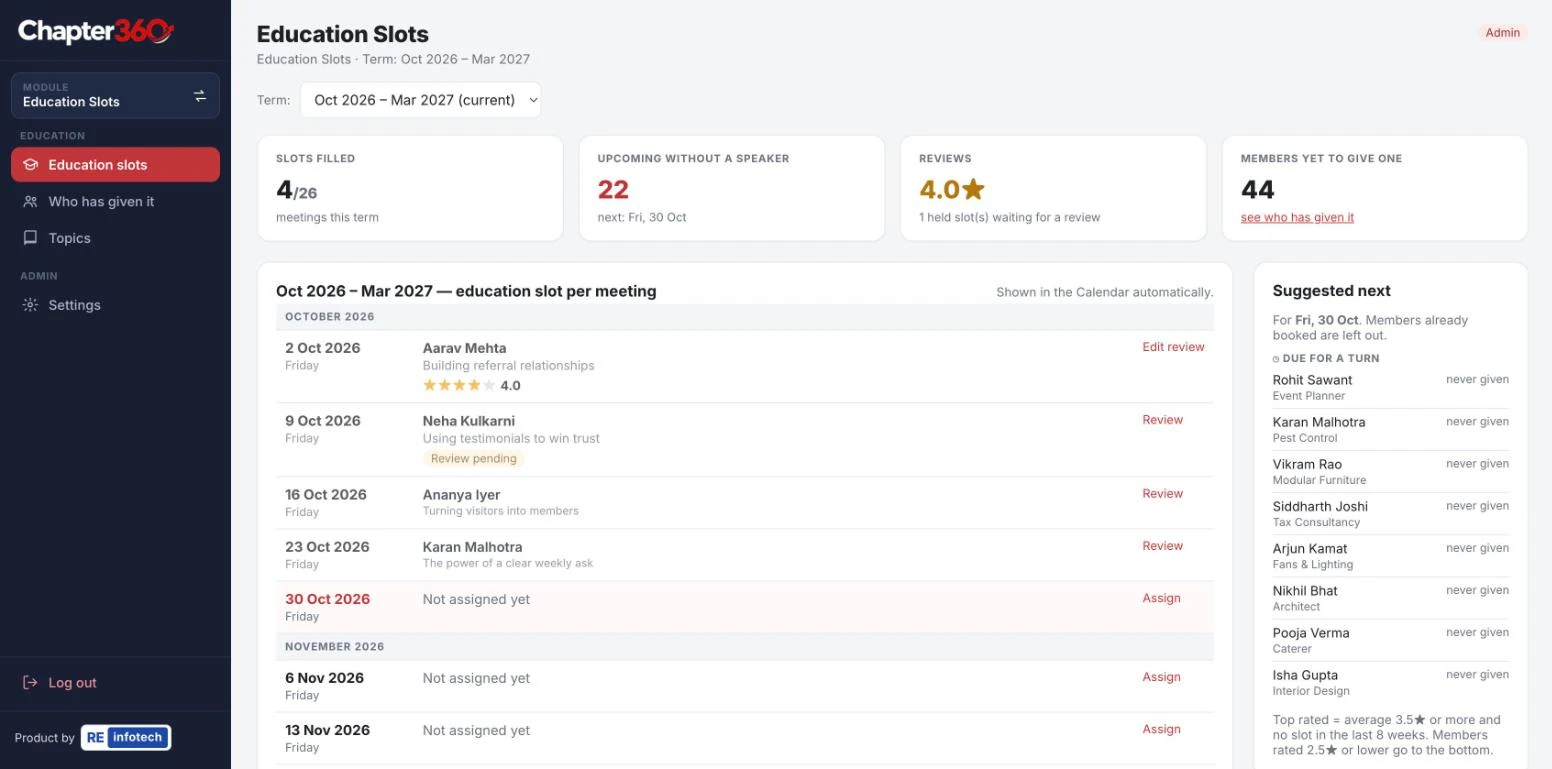
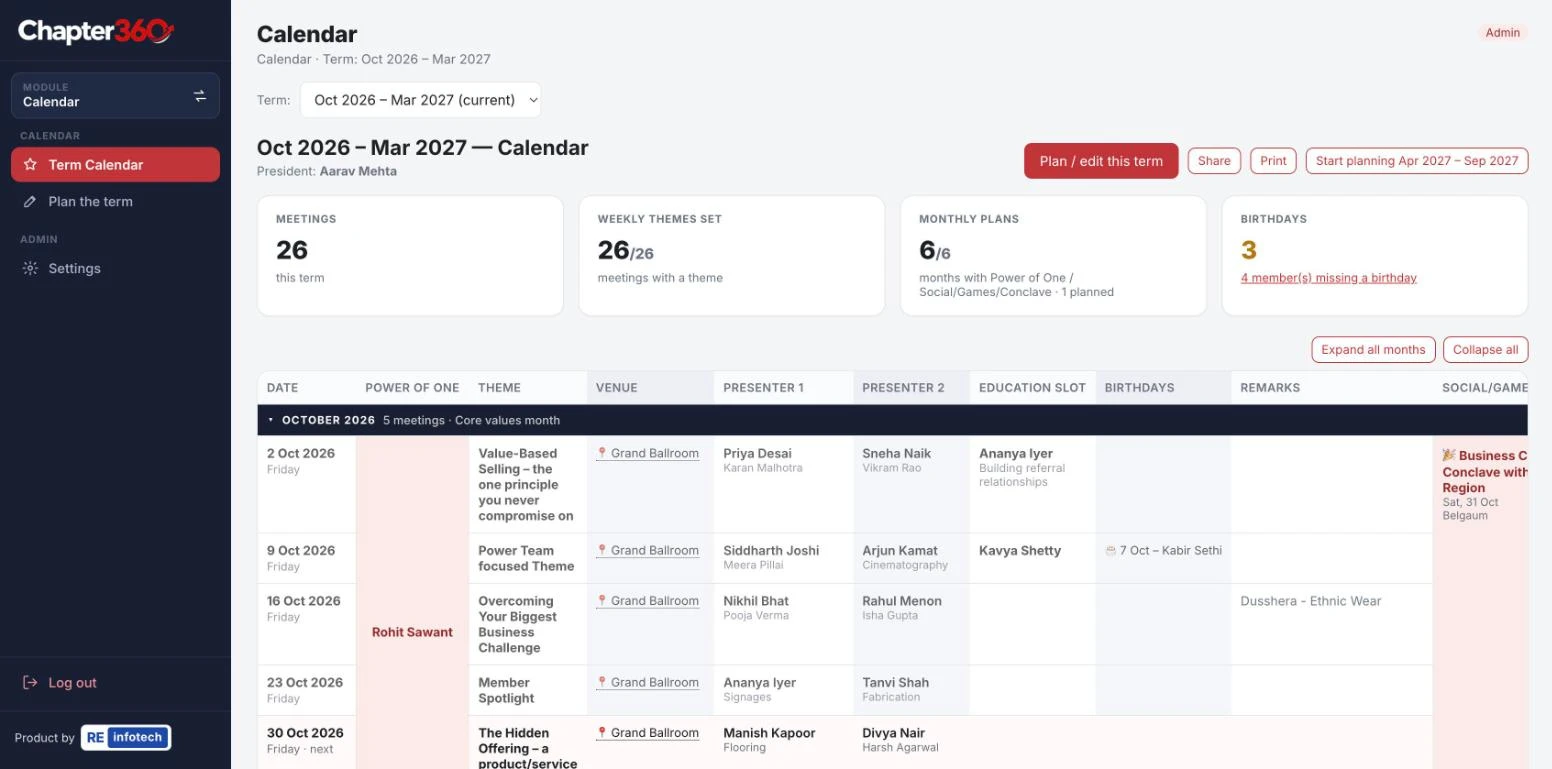
Chapter360 accounts module showing total receipts, payments, closing balance and the receipts and payments summaryChapter360 presentations module showing weekly presenters scheduled across the termChapter360 teams board showing four teams with captains, members and next meetingsChapter360 education slots module showing slots filled, reviews and suggested next speakersChapter360 term calendar showing meetings, themes, venues, presenters, education slots and birthdaysChapter360 Conclaves overview with referrals, 1-2-1s, attendance, estimated business and QR links to share
Chapter360 modules, shown with sample data.

Chapter360 features in screenshots
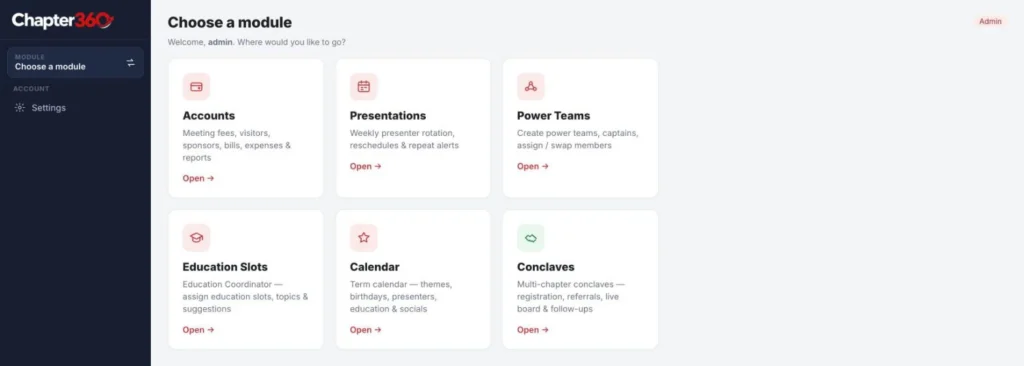
Chapter360 modules: accounts, presentations, power teams, education slots, term calendar and conclaves

All chapter modules in one app

Chapter360 modules: accounts, presentations, power teams, education slots, term calendar and conclaves.
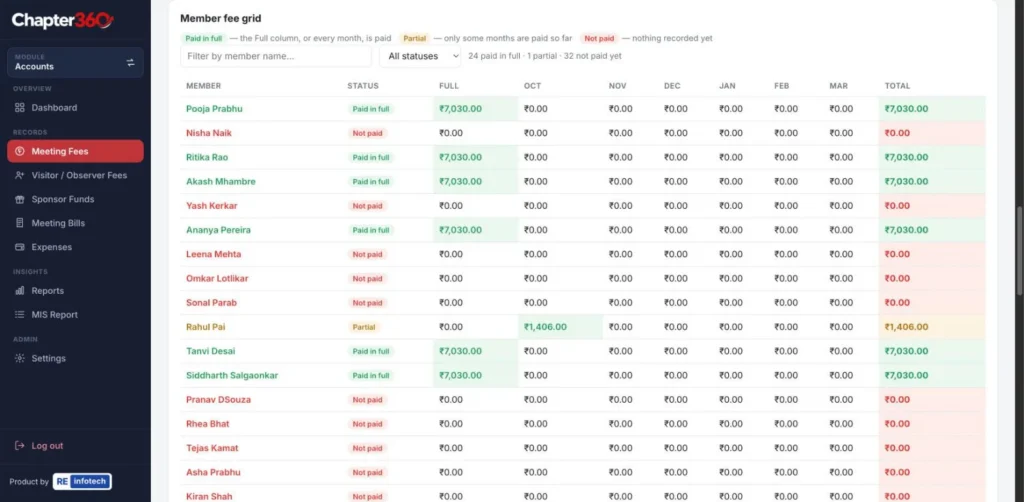
Chapter360 member fee grid showing paid in full, partial and not paid for each month of the term (names and figures changed)

Member fee grid: paid and not paid

Chapter360 member fee grid showing paid in full, partial and not paid for each month of the term (names and figures changed).
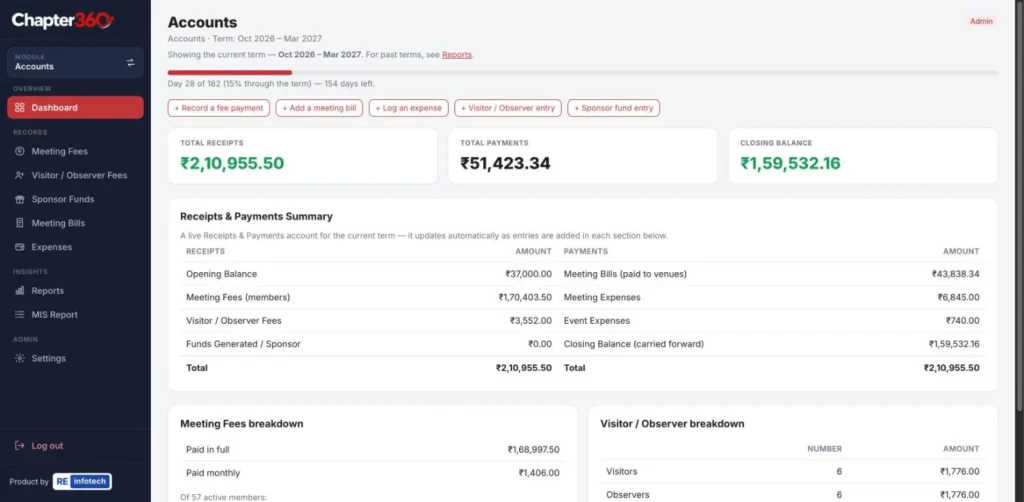
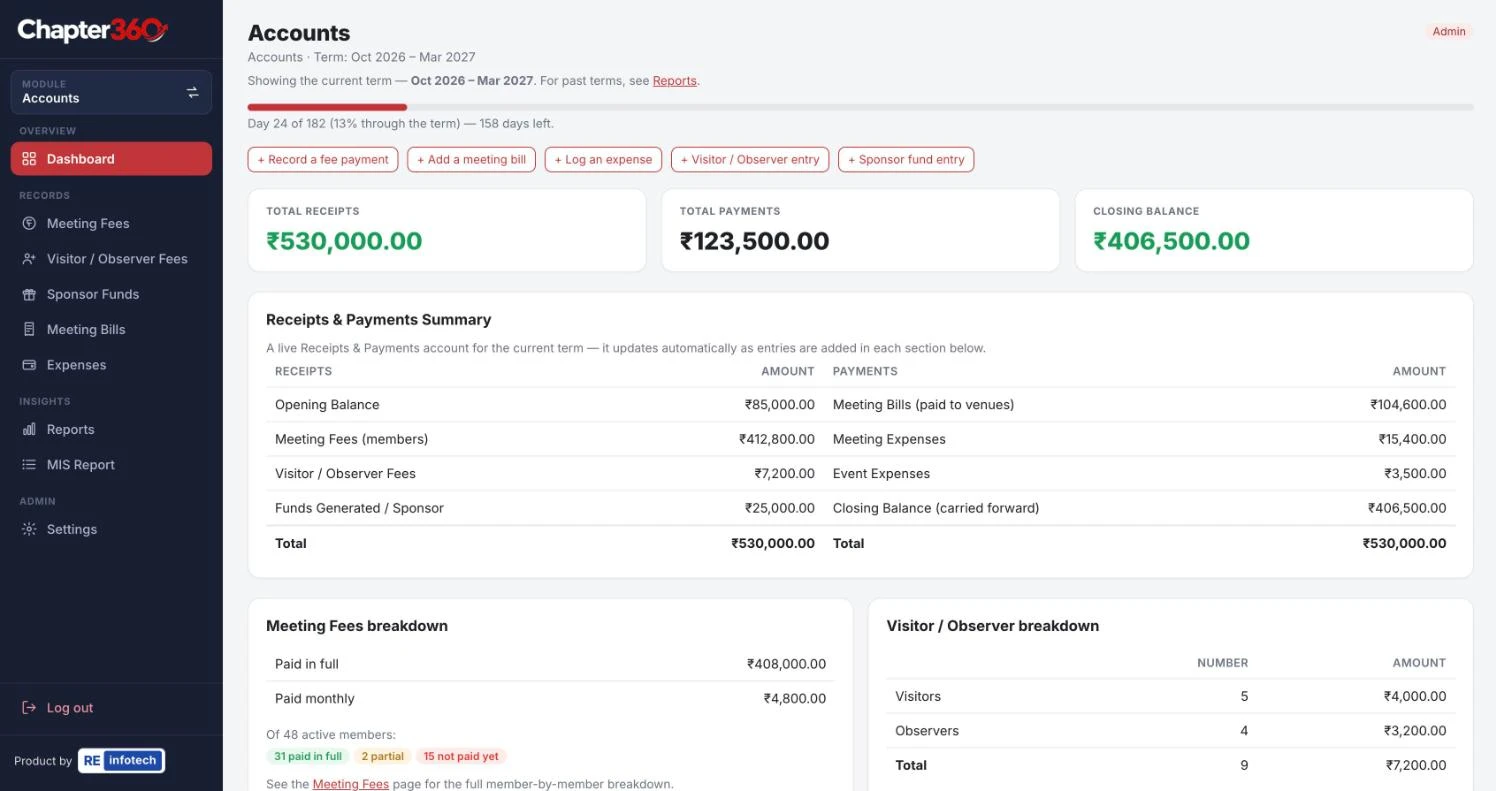
Chapter360 accounts dashboard with total receipts, payments, closing balance and a receipts and payments summary (figures changed)

Chapter accounts: receipts and payments

Chapter360 accounts dashboard with total receipts, payments, closing balance and a receipts and payments summary (figures changed).
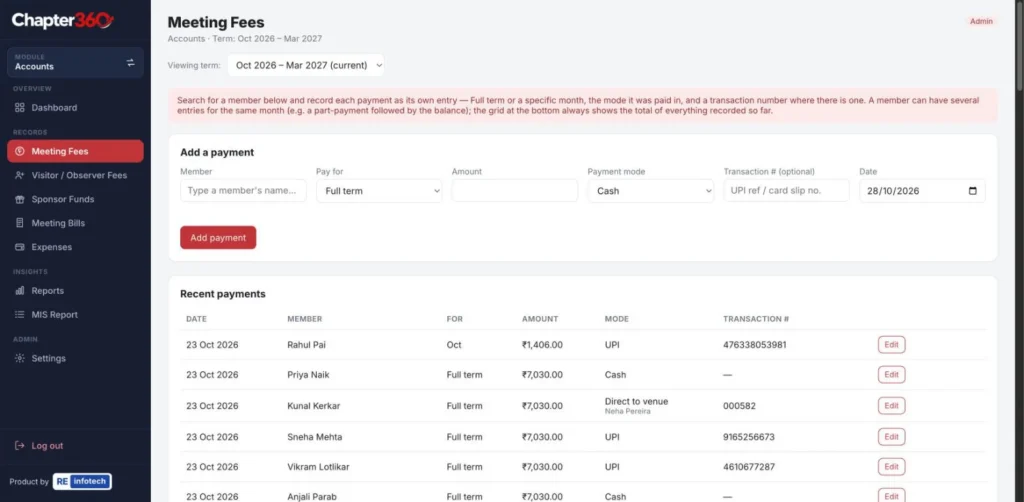
Chapter360 meeting fee payments by member with amount, payment mode and transaction number (names and figures changed)

Meeting fee payments per member

Chapter360 meeting fee payments by member with amount, payment mode and transaction number (names and figures changed).
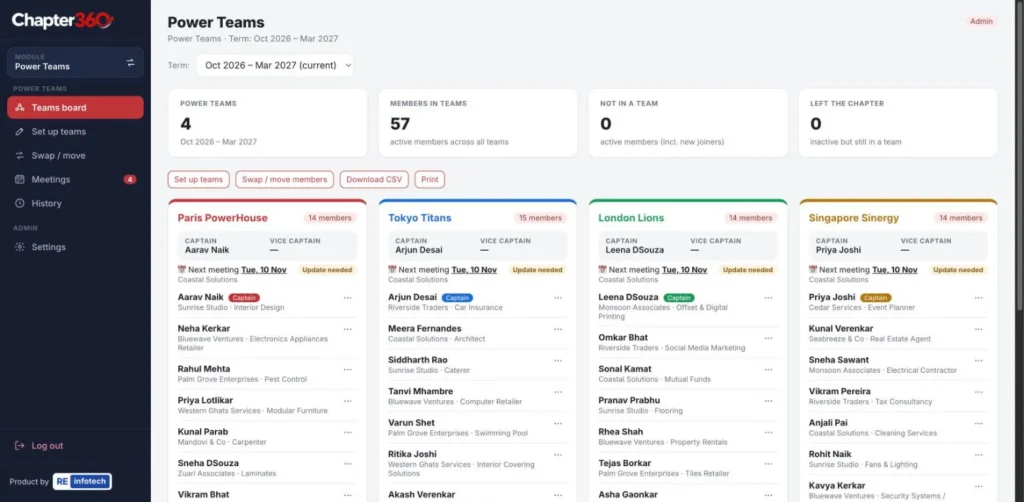
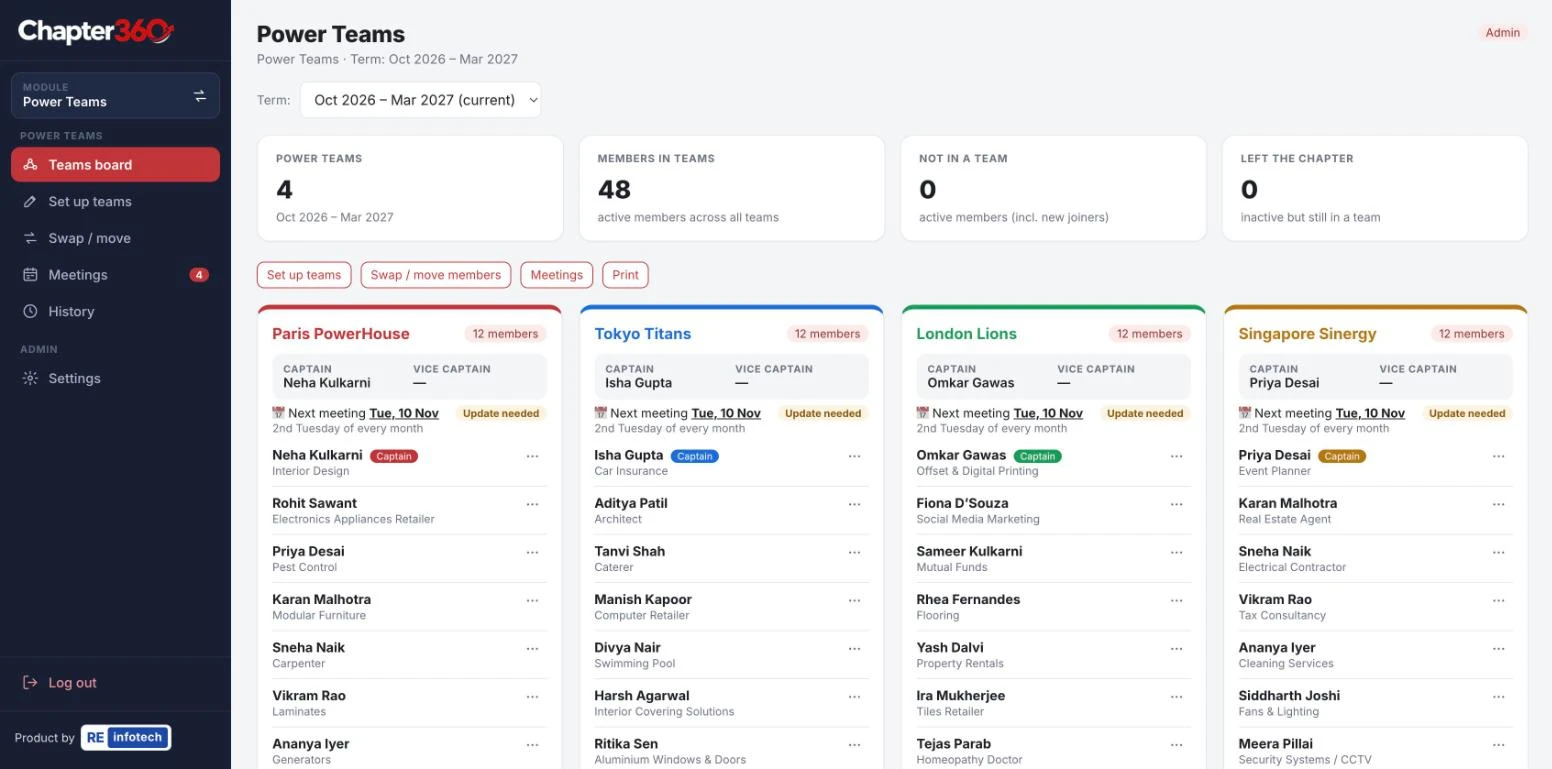
Chapter360 power teams board with captains, members and next meeting for each team (names changed)

Power Teams board

Chapter360 power teams board with captains, members and next meeting for each team (names changed).
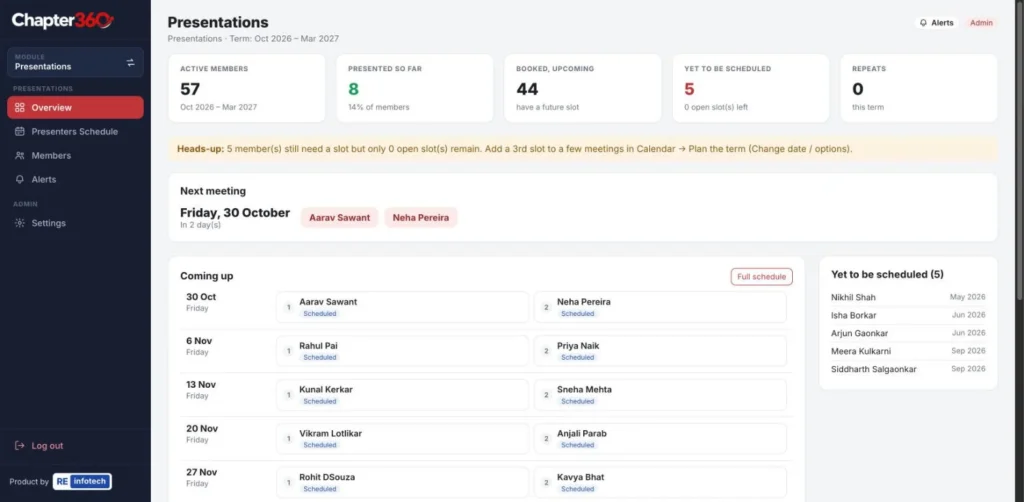
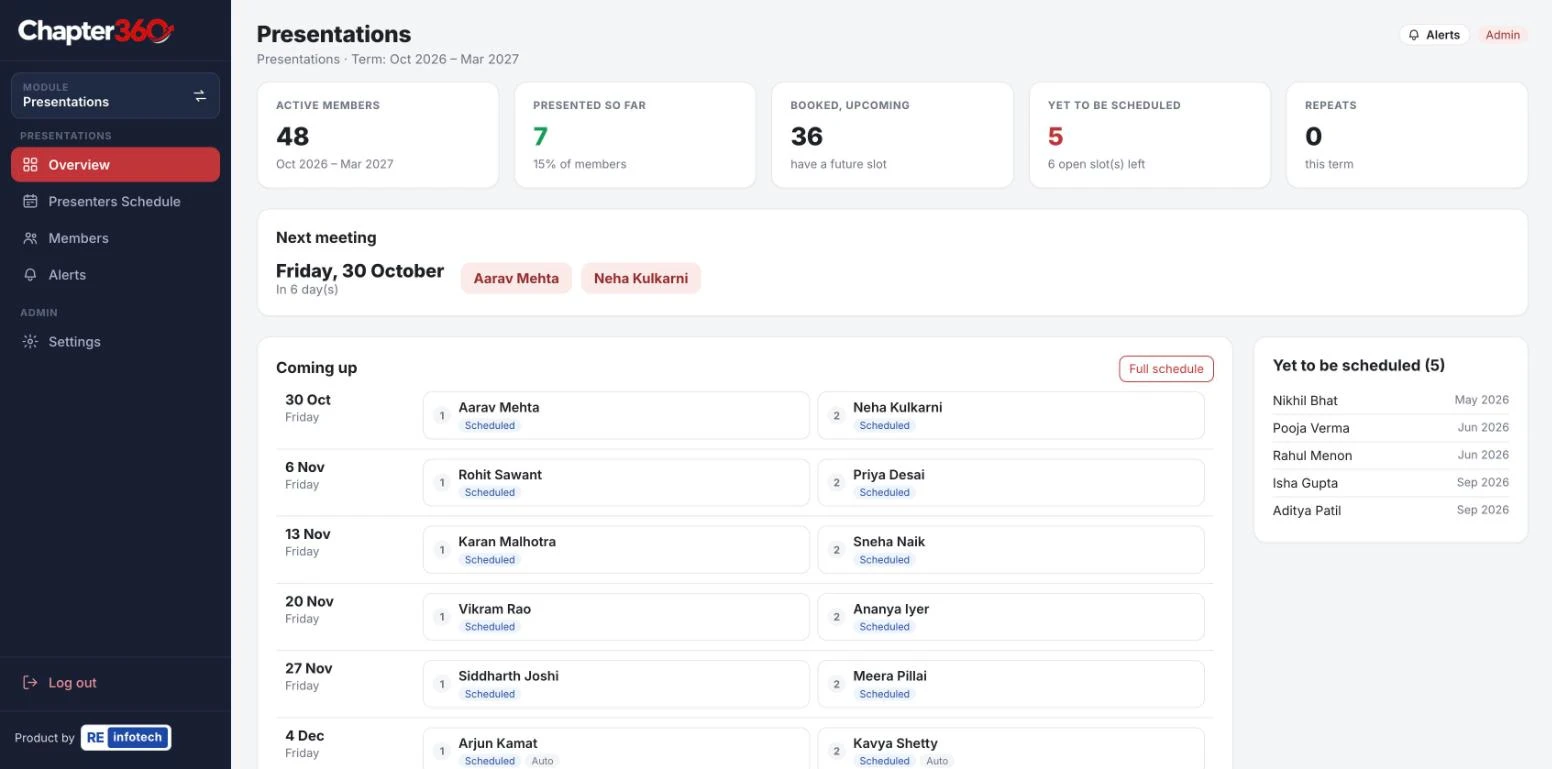
Chapter360 weekly presenter rotation with upcoming presenters and members yet to be scheduled (names changed)

Weekly presenter rotation

Chapter360 weekly presenter rotation with upcoming presenters and members yet to be scheduled (names changed).

Screenshots from the live Chapter360 app with sample data.

Who it’s for

Built for your chapter’s leadership team

Chapter360 is for the people who keep a chapter running: the President, Vice President, Secretary Treasurer, Education Coordinator and Power Team Coordinator. Members get view-only access, so everyone can see the schedule and calendar without being able to change it.

When the leadership team changes, the data stays in place, so the next team can pick up from day one instead of starting a new spreadsheet.

Want members to share contacts after the meeting? Pair Chapter360 with ShowQR digital visiting cards.

Features

Six modules. One chapter.

Accounts

Chapter accounts, fees, dues and renewals, with MIS reports for the Secretary Treasurer.

Presentations

Weekly presenters scheduled fairly across the term, so no one is missed and no one is repeated.

Power Teams

Create teams, set captains and vice captains, swap members and track Power Team meetings week by week.

Education slots

Assign each meeting’s education slot and topic to a member or regional speaker, and record a review of every session.

Term calendar

Meetings, themes, Power of One, socials, games, conclaves and member birthdays for the whole term.

Conclaves

Run a multi-chapter conclave: QR registration, 1-2-1s and referrals from phones, a live scoreboard and WhatsApp follow-ups.

Conclaves: run a multi-chapter networking event, live

Conclaves is the Chapter360 module for multi-chapter networking events. It handles registration, lets members log 1-2-1s and referrals from their phones, shows a live scoreboard on the projector and prepares WhatsApp follow-ups afterwards.

  • QR registration and RSVP: members of every chapter register through one link with photo, business and category. Existing members only need their mobile number.
  • Personal QR cards: each attendee gets a digital card that others can scan to message them on WhatsApp. Cards can be printed for everyone or by chapter.
  • 1-2-1s and referrals in a few taps: a QR code on each table lets members log a 1-2-1 or a referral, with the client, need, warmth and estimated value.
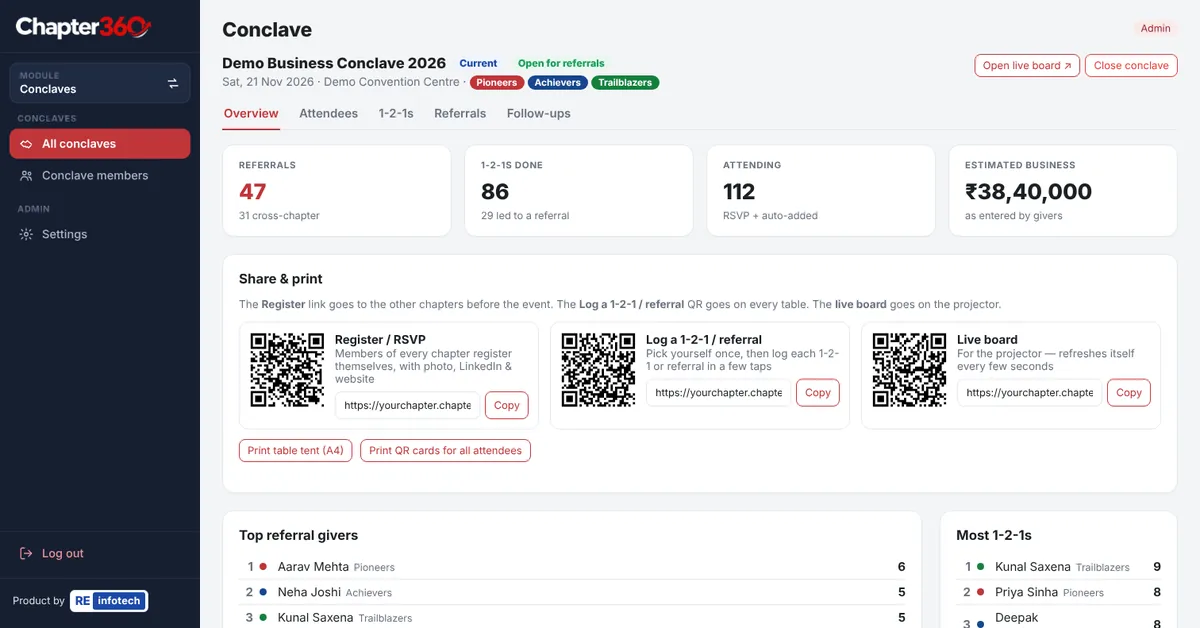
  • Live scoreboard: total referrals, 1-2-1s, cross-chapter referrals, a chapter race bar and the top givers, refreshed every few seconds.
  • WhatsApp follow-ups: each receiver gets one message listing their referrals, and each giver gets a thank-you. The organiser reviews and sends every message.
  • Referral list and CSV: search, filter by hot, warm or cold, add notes and download.
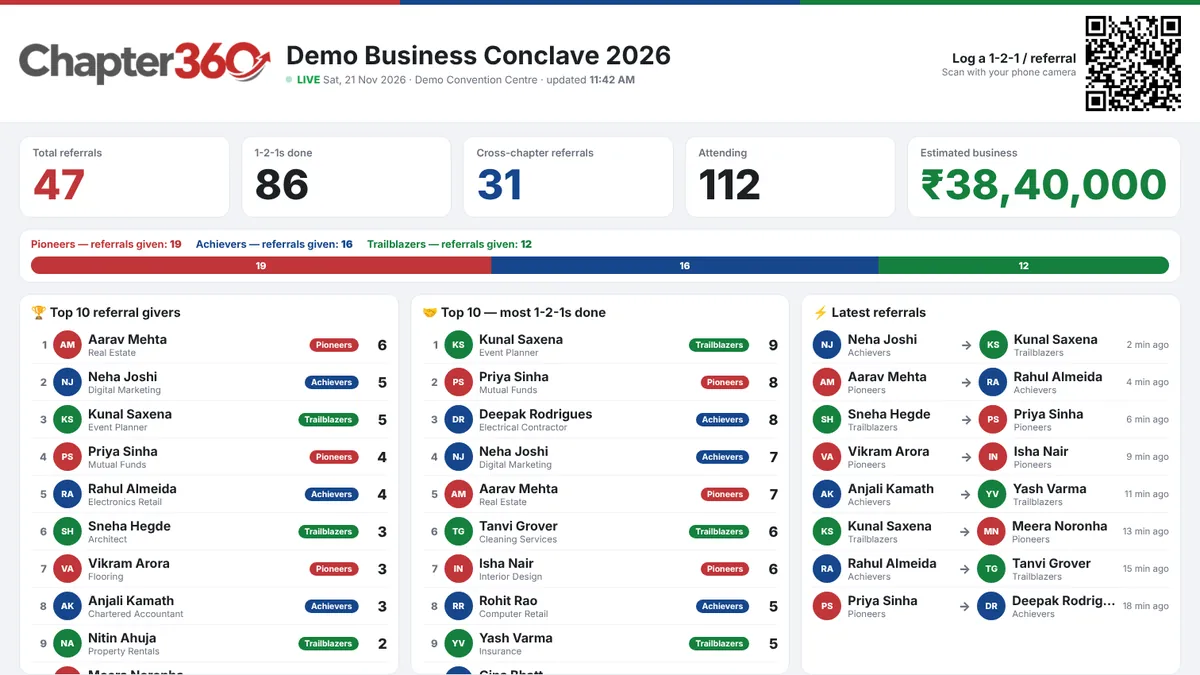
Chapter360 live conclave scoreboard on a projector with totals, chapter race bar, top referral givers, most 1-2-1s and latest referrals

How it works: create the conclave with its date, venue and participating chapters, share the Register link, place table tents on the tables and the live board on the projector, then close the conclave, send the follow-ups and download the referral list. Shown with sample data.

FAQ

Frequently asked questions

Chapter360 works for chapters of business networking platforms that run weekly meetings, presentations and member dues.

No. Chapter360 is an independent product built by Re-Infotech and is not affiliated with or endorsed by any networking organisation.

Yes. Members get view-only access, so they can see presentations, education slots and the calendar, while only the leadership team can make changes.

All the chapter’s data stays in Chapter360, so the incoming team takes over with the full history and schedule already in place.

Book a free demo and we will walk your leadership team through Chapter360 and set up your chapter.

It runs a multi-chapter networking event from one app: registration and RSVP, QR-based logging of 1-2-1s and referrals, a live scoreboard, printable QR cards and table tents, and WhatsApp follow-ups.

No. They scan a QR code with their phone camera and use simple web pages. Their phone remembers them for later entries.

No. It prepares each follow-up message, and the organiser opens, checks and sends it.

Book a free demo

Tell us a little about your organisation and we will call you back to arrange a free demo of Chapter360.

2nd Floor, Ponda Commerce Centre, SO-15, Tiska, Durgabhat, Ponda, Goa 403401
Monday to Saturday, 10 am to 6 pm
enquiry@re-infotech.com

What happens after you send this

We contact you

We call or WhatsApp you during working hours, Monday to Saturday, 10 am to 6 pm.

We listen

A short conversation about your business, goals and current setup.

You get a plan

Clear recommendations, scope and a fixed quote, with no obligation.

Your details are used only to respond to your enquiry. See our Privacy Notice.

Book a Consultation

Last updated: