
Short answer: Most small businesses lose money between the first enquiry and the final payment in five places: follow-ups that rely on memory, quotations revised in several places, work orders that lose sight of the customer’s PO, finished jobs that are never billed and invoices nobody chases. Running the whole chain, from enquiry to quotation, work order, invoice and receipt, in one connected system closes these gaps, because each step creates the next one and reminders go out automatically.
If you run a manufacturing unit, a contracting firm, a trading business or a service company, your sales probably start the same way: a call, a WhatsApp message or a walk-in asking for a price. What happens after that is where profit is made or quietly lost. This guide walks through the gaps we see most often and what a simple, connected workflow looks like.
Where money leaks between enquiry and invoice
1. Follow-ups that depend on someone’s memory
An enquiry noted in a diary, a spreadsheet or a WhatsApp chat is easy to forget. The customer who asked for a price on Monday buys from a competitor on Thursday because nobody called back. Every enquiry needs a source, an owner and a next follow-up date, and someone needs to be reminded when that date arrives.
2. Quotations revised in five different places
Customers negotiate. Rates change, quantities change and terms change. When each revision is a new Word file or a new message, nobody is sure which version the customer accepted. That leads to disputes at billing time and margins that disappear in the confusion.
3. Work orders that lose sight of the customer’s PO
Once a customer confirms with a purchase order (PO), the job moves to production or the site team. If the work order is not linked to the accepted quotation and the PO, details get retyped, mistakes creep in and the team works from a different version of the truth than the customer.
4. Jobs completed but never billed
This one surprises many owners. A job is delivered, the team moves on and the invoice is raised late, partly or not at all. Without a clear list of completed but unbilled work, revenue that has already been earned is simply not collected.
5. Invoices that nobody chases
Raising an invoice is not the same as getting paid. Proformas, tax invoices, part payments, receipts and credit notes all need to be recorded against the right job, and overdue amounts need polite, regular reminders on the channel the customer actually reads.
What a connected enquiry-to-invoice workflow looks like
- Capture the enquiry with who asked, what they need, where the lead came from and when to follow up.
- Quote and revise, keeping every version so you always know what was offered and what was accepted.
- Create the work order from the accepted quotation and link it to the customer’s PO.
- Track the job until it is complete, so finished work is flagged for billing.
- Invoice and collect with GST-ready invoices or proformas, then record receipts and credit notes against them.
The key idea is that each step is created from the previous one. You never retype a customer’s details or a rate, and you can open any customer or job and see its full history in one place.
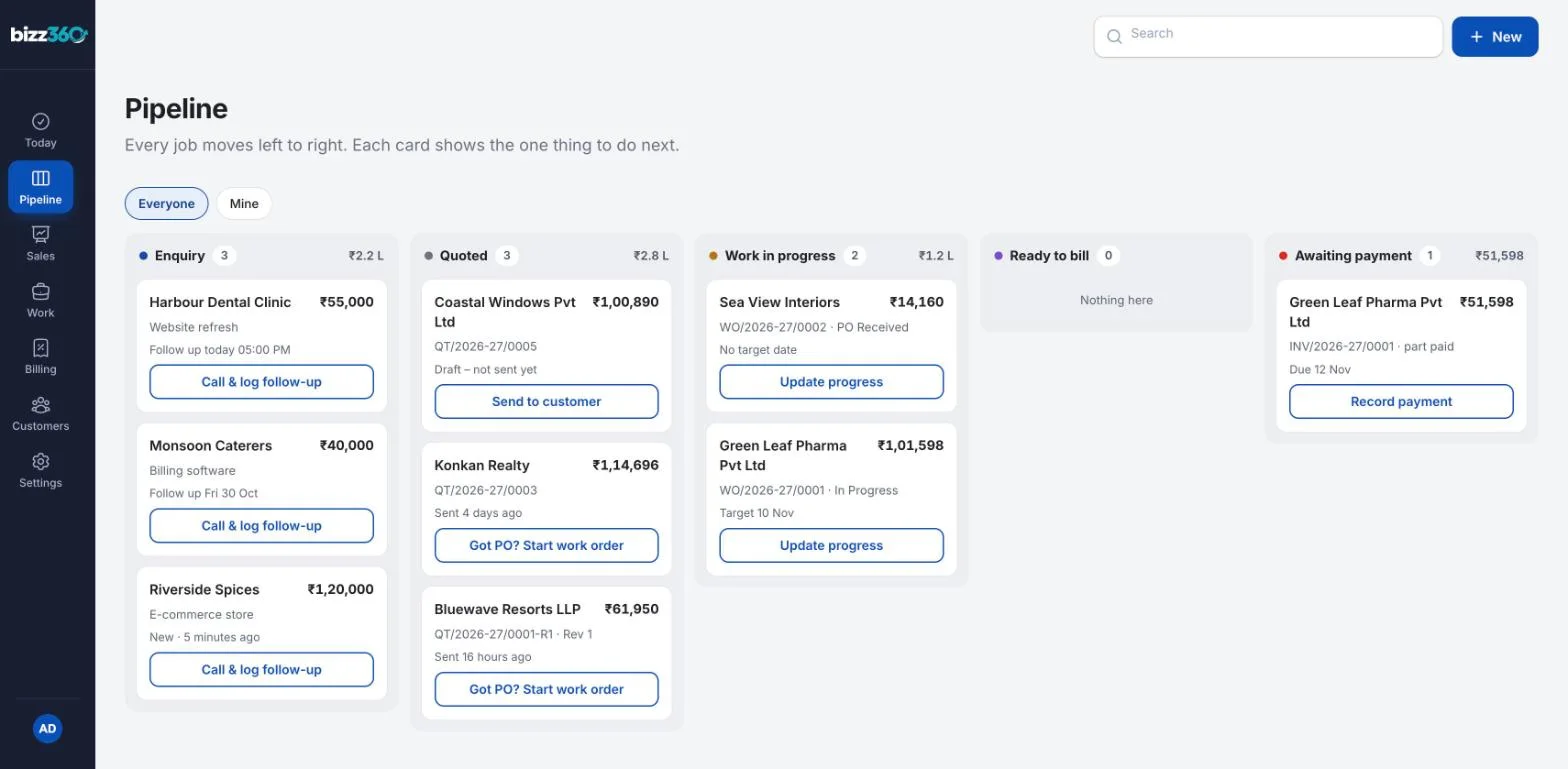
Spreadsheets and chats vs a connected system
| Task | Spreadsheets, notebooks and WhatsApp | Connected enquiry-to-invoice system |
|---|---|---|
| Follow-ups | Depend on someone remembering | Due follow-ups listed every day, with reminders |
| Quotation versions | Scattered files and messages | Every revision stored against the enquiry |
| Work orders | Retyped from the quotation | Created from the accepted quotation and PO |
| Billing | Raised when someone notices | Completed jobs visible for invoicing |
| Payments | Tracked in a separate sheet | Receipts and credit notes recorded against each invoice |
| Customer history | Spread across people and phones | One view of every enquiry, quote, job and invoice |
What to look for in enquiry-to-invoice software
- Enquiry tracking with source, owner and next follow-up date.
- Quotation revisions kept on record, not overwritten.
- Work orders linked to the customer’s PO.
- GST-ready invoicing for tax invoices and proformas, with receipts and credit notes.
- Reminders and sharing by email, WhatsApp and SMS, because that is where Indian customers actually reply.
- One customer view so anyone in the team can answer “where does this stand?” in seconds.
- Roles and access so sales, operations and accounts see what they need.
How Bizz360 helps
We built Bizz360, our business management software, around exactly this workflow. Each enquiry is logged with its source and next follow-up, turned into a quotation, then a work order when the customer sends a PO, and finally a GST invoice and payment, all linked together.
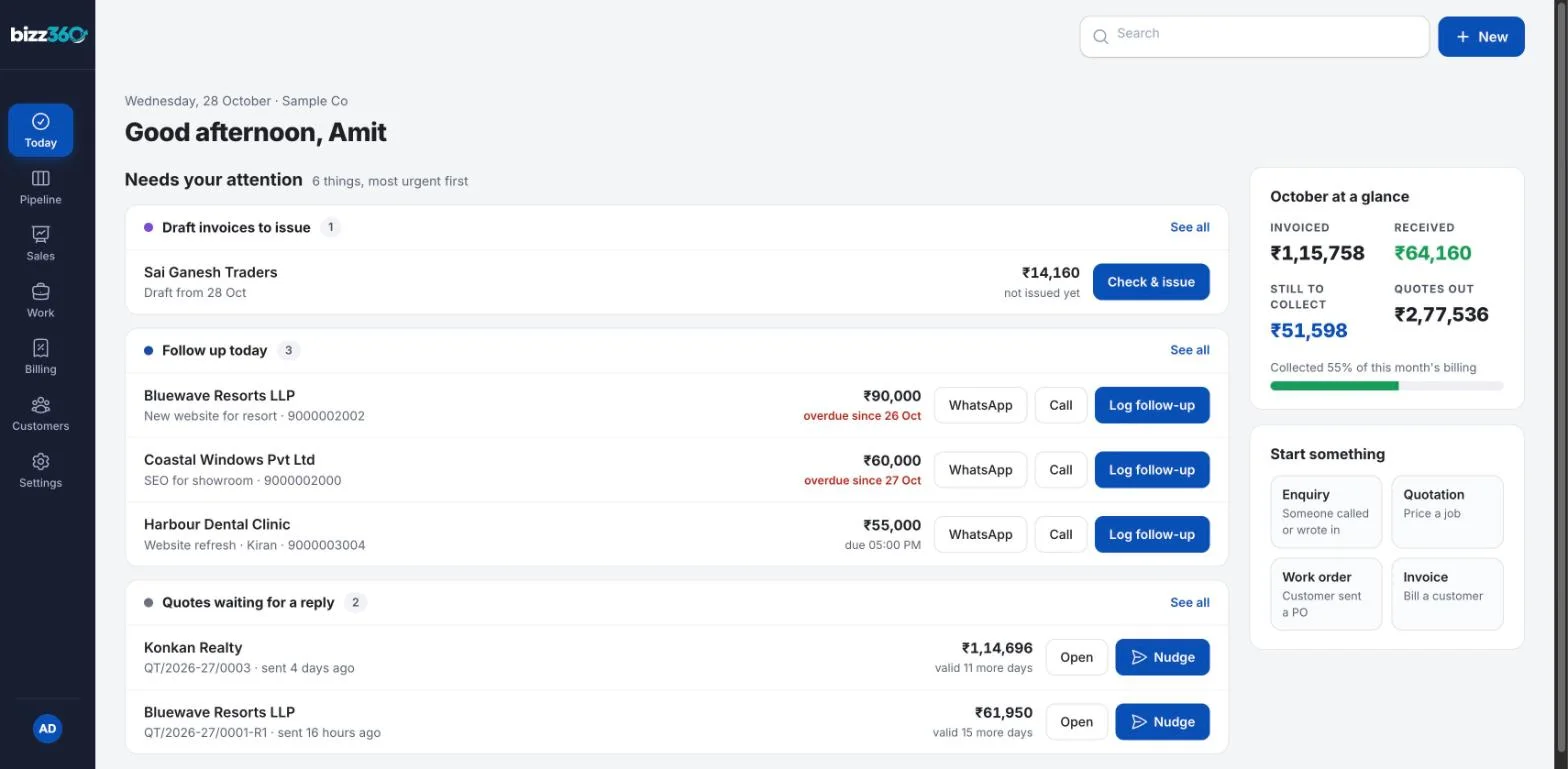
The Today screen lists what needs attention first: follow-ups due, quotes waiting for a reply, draft invoices to issue and money still to collect. From any customer you can call, WhatsApp or email in one tap.
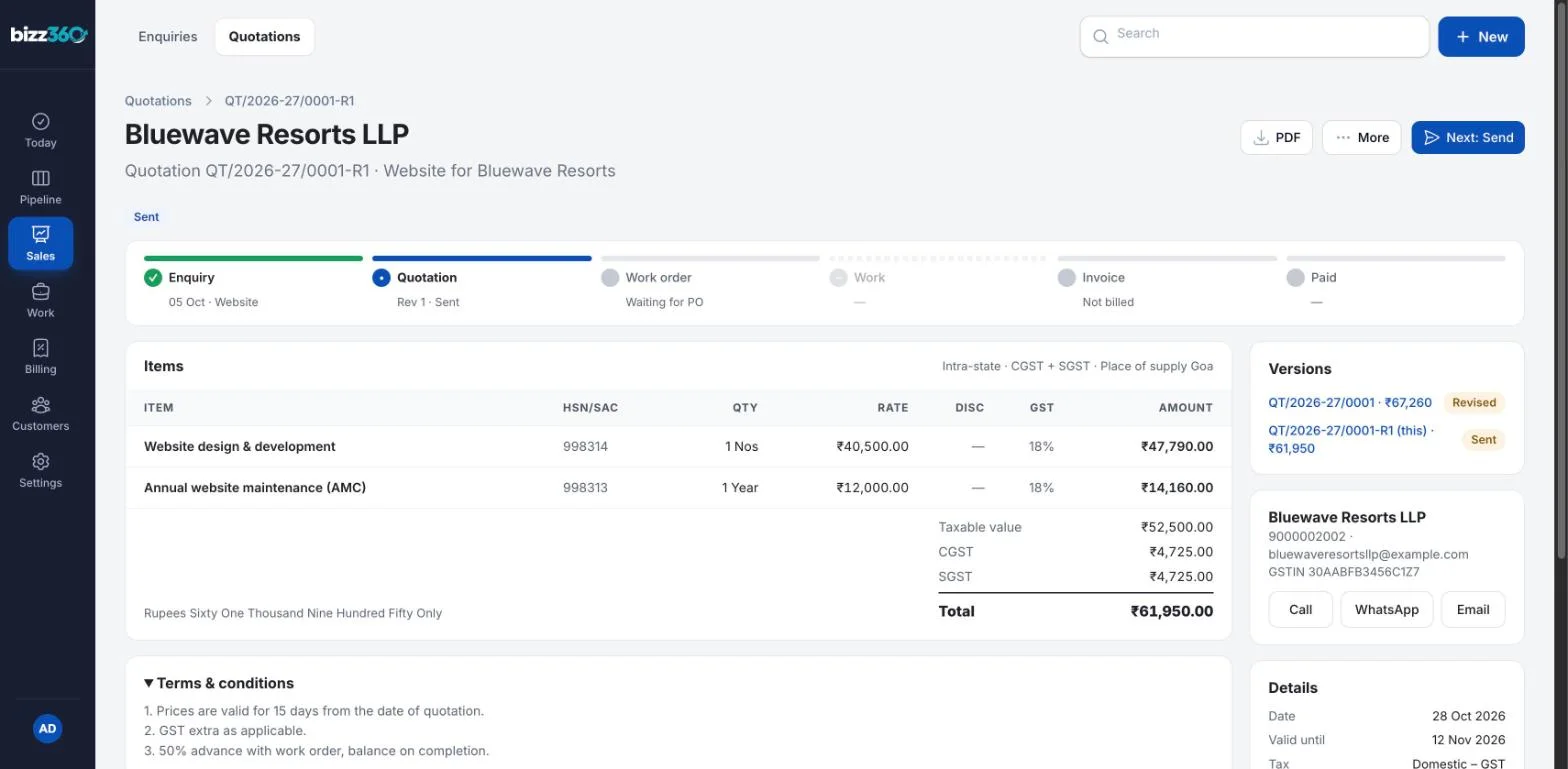
Quotations keep every revision, invoices are raised from the work order with CGST, SGST or IGST worked out, and proformas, credit notes and receipts sit in the same place.
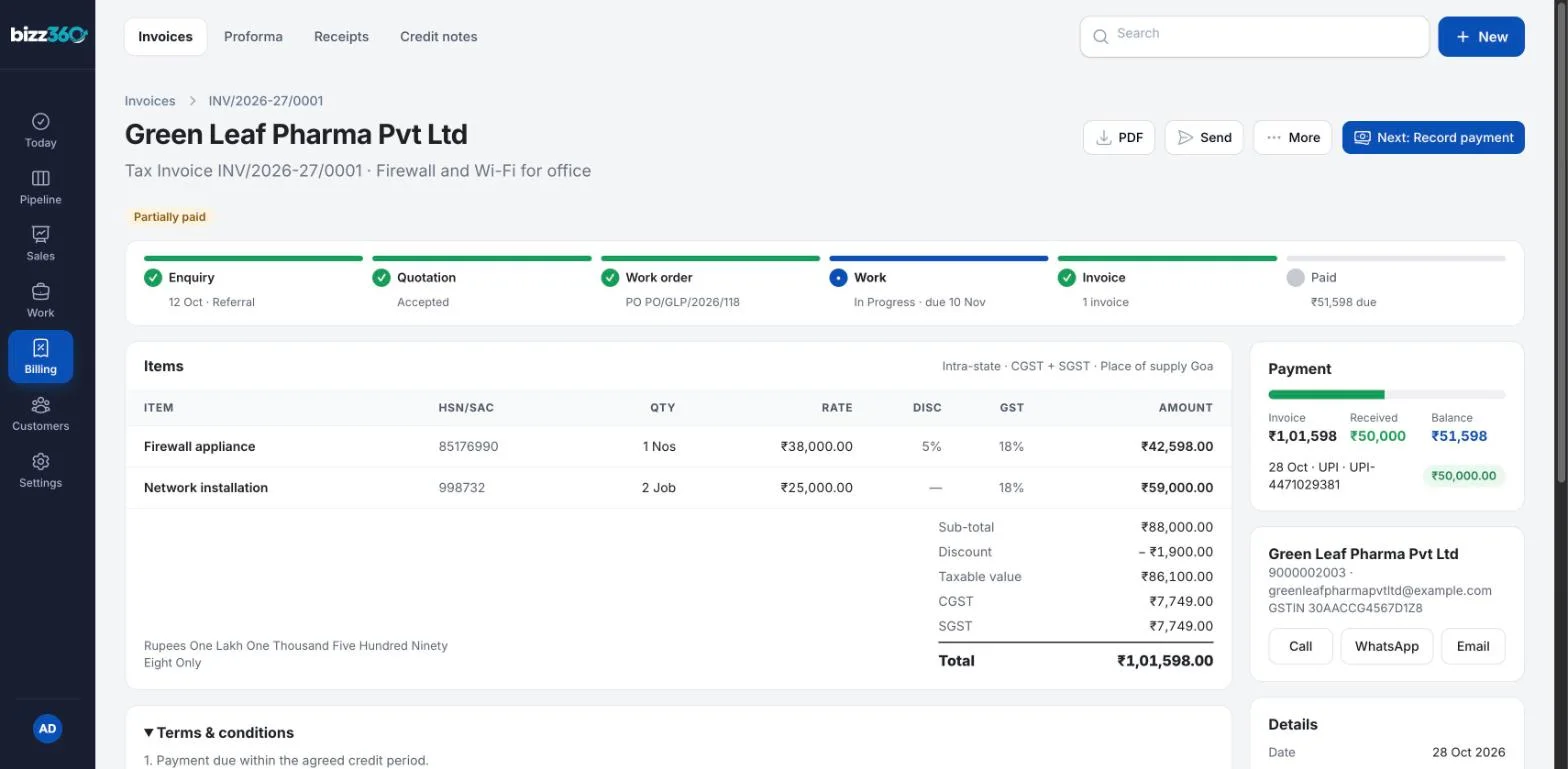
Book a free demo to see it with sample data like the screenshots above. If your process is too specific for ready-made software, our Excel to App service turns the spreadsheet you already use into a simple application. Not sure which you need? Read 5 signs your business has outgrown Excel.
Sources and further reading
Official sources we referred to. Laws and platform rules change, so check the latest version.
- e-Invoice System: Invoice Registration Portal (GST Network)
- WhatsApp Business Messaging Policy (Meta)
Frequently asked questions
What is enquiry-to-invoice software?
It is software that tracks a sale from the first enquiry through follow-ups, quotations, work orders and invoices to the final payment, with each step created from the previous one so nothing is retyped or forgotten.
Is this the same as accounting software?
No. Accounting software records the books after a sale. Enquiry-to-invoice software manages the sales and job workflow that leads to the invoice, and the invoice data can then be used for accounting.
Can quotations and invoices be sent on WhatsApp?
Yes. A good system lets you share quotations, invoices and payment reminders by email, WhatsApp and SMS, so each customer gets them on the channel they use.
Which businesses benefit most?
Businesses that quote before they deliver: manufacturers and fabricators, contractors, service companies, traders and distributors with a steady flow of enquiries and jobs.