
Short answer: A job card is the single record of a print order: the party, paper, size, quantity, ink, machine, finishing, delivery and billing details. Printing presses that manage job cards on paper or in a spreadsheet often lose track of status, delay jobs and forget to bill completed work. Job card software keeps every job in one place, tracks it from quote to delivery, schedules it across machines and staff, and gives you reports on jobs and revenue whenever you need them.
An offset or digital press can handle dozens of small jobs a day: visiting cards, letterheads, bill books, brochures, stickers, flex banners and wedding cards. Each one passes through several hands, from the front desk to the designer, the machine operator, finishing and binding, and finally billing. A good job card is what keeps all of them working from the same information.
What a print job card should contain
| Section | Details to record |
|---|---|
| Party and order | Customer, job name, order date, promised delivery date, quote reference |
| Print module | Digital, large-format digital, single-colour offset, multi-colour offset or screen printing |
| Paper and size | Paper type and GSM, size, number of sheets, number of copies |
| Printing | Ink or colours, machine, printer (operator), designer, special instructions |
| Finishing and binding | Lamination, spot UV, foiling, punching, numbering, pads, books, binding |
| Delivery | Full or part delivery, delivered quantity and date |
| Billing | Bill amount, GST inclusive or exclusive, complimentary jobs, who prepared the bill |
Why paper job cards cause problems
- Status is invisible. To answer “is my job ready?”, someone has to walk to the shop floor and look.
- Cards go missing or get damaged. A lost card means retyping details and the risk of printing the wrong specification.
- Machines are not planned. Without a schedule, some machines are overloaded while others wait.
- Finished work is not billed. Jobs delivered in a rush are easy to forget at billing time, and small jobs add up.
- No reports. It is hard to see revenue by party, pending jobs or which print module earns the most.
How to track print jobs properly
- Open a job card for every order at the quote or order stage, using the right print module.
- Schedule the job on a machine with a printer and designer assigned.
- Update the status as it moves: pending, in progress, ready, delivered, on hold or cancelled.
- Record finishing and binding on the same card so nothing is skipped.
- Record delivery, including part deliveries.
- Bill against the job card with GST details, so every delivered job is invoiced.
- Review reports weekly by status, module, party and vendor.
When should a press move to job card software?
If you handle more than a few jobs a day, have more than one machine or operator, or have ever discovered a delivered job that was never billed, software will save time and money. It also helps when customers call for updates, because anyone at the front desk can answer in seconds.
How PrintJob360 helps

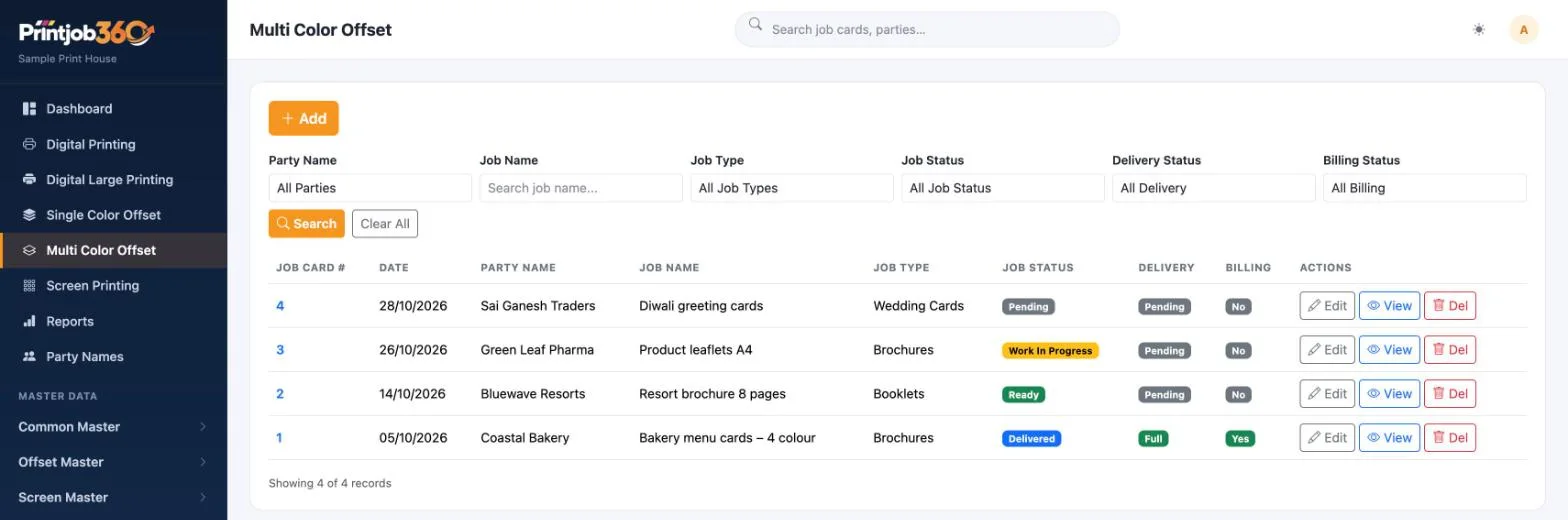
PrintJob360 is our job card management software for printing presses. It covers digital, large-format digital, single-colour offset, multi-colour offset and screen printing, each with its own job list.
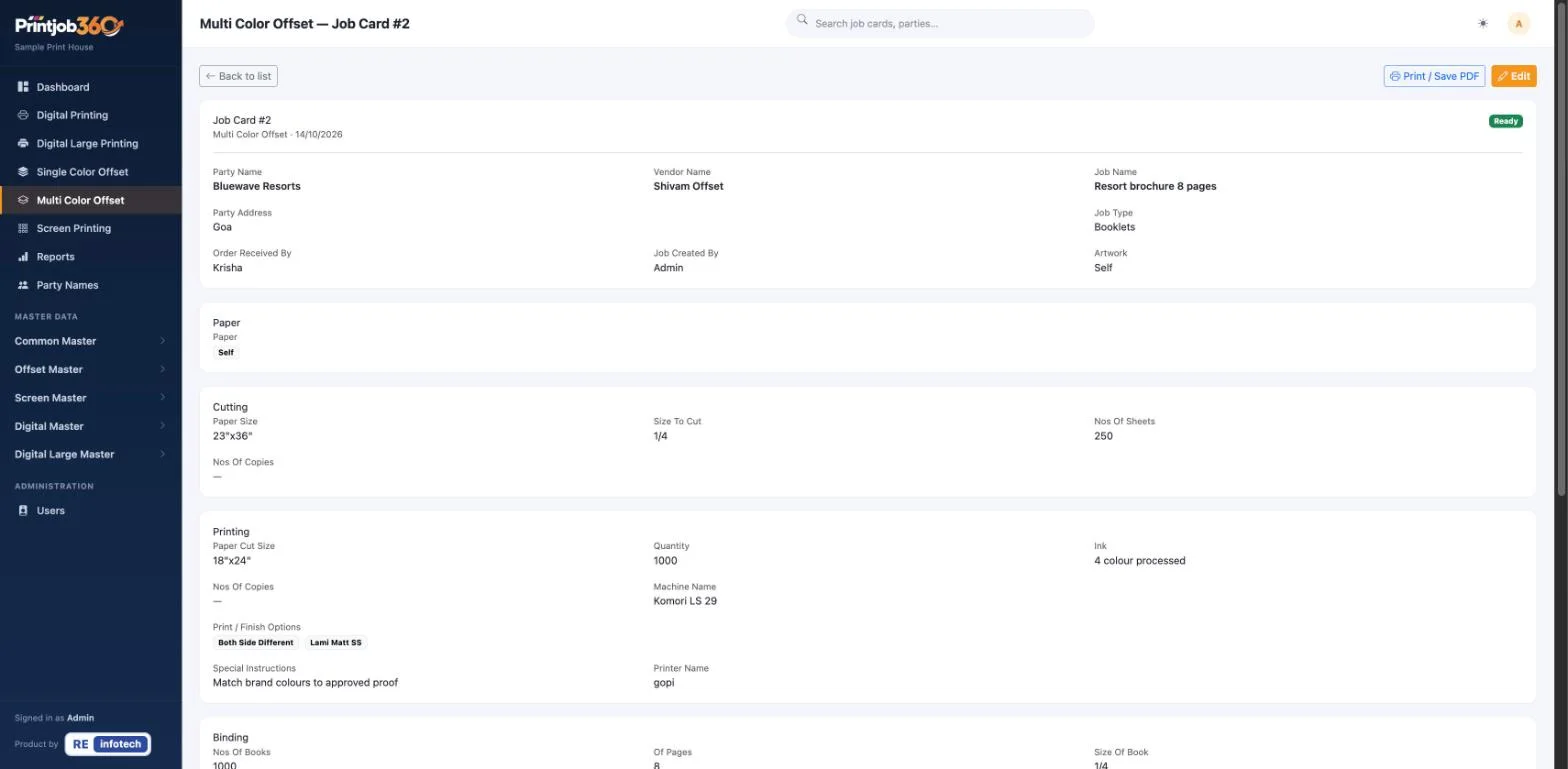
Each job card records the party, vendor, paper, cutting, printing, machine, finish options such as lamination, binding and special instructions, and prints as a PDF for the shop floor. Job status, delivery status and billing status are tracked on the same card.
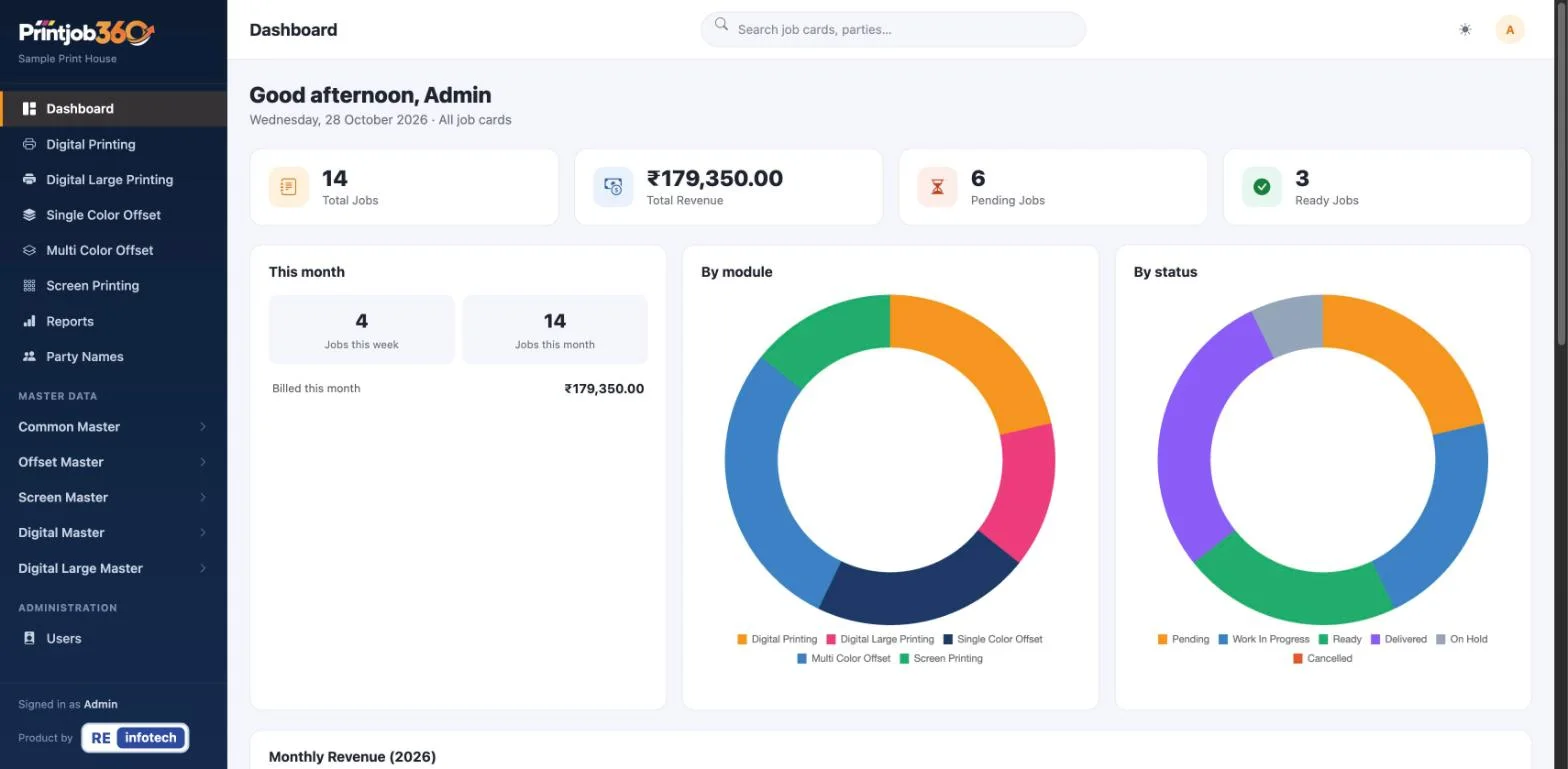
The dashboard and Reports & MIS show jobs and revenue by status, by module and by customer, with CSV export. Book a free demo to see it with sample data. Already running your press on a large spreadsheet? Read 5 signs your business has outgrown Excel, or ask about our Excel to App service.
Already running your press on a large spreadsheet? Read 5 signs your business has outgrown Excel, or ask about our Excel to App service.
Frequently asked questions
What is a job card in a printing press?
A job card is the record of one print order. It holds the party, paper, size, quantity, ink, machine, finishing, delivery and billing details, and travels with the job from order to delivery.
What is job card software for printing?
It is software that creates and tracks job cards digitally, schedules jobs across machines and staff, shows the status of every job and produces reports on jobs and revenue.
Can job card software handle both offset and digital printing?
Yes. Good print job card software has separate modules for digital, large-format, single-colour offset, multi-colour offset and screen printing, each with the fields that process needs.
Does it help with billing?
Yes. Recording the bill against each job card, with GST details, makes it easy to see which delivered jobs have not been billed yet.